


Join us to show up for other Firefox users 🦊. Earn fun badges and Mozilla swag vouchers! Find out more: https://mzl.la/askafox150

Windows 10 reached EOS (end of support) on October 14, 2025. If you are on Windows 10, see this article.

Przeszukaj pomoc

Unikaj oszustw związanych z pomocą.Nigdy nie będziemy prosić Cię o dzwonienie na numer telefonu, wysyłanie SMS-ów ani o udostępnianie danych osobowych. Zgłoś podejrzaną aktywność, korzystając z opcji „Zgłoś nadużycie”.

Więcej informacji

Links opening in new windows, not in same or new tab

  • 3 odpowiedzi
  • 4 osoby mają ten problem
  • 126 wyświetleń
  • Ostatnia odpowiedź od zipsinger99
  • Rozwiązane

Hyperlinks keep opening in new windows, not in the same/existing window where they were selected. Issue is not unique to Google Search results and occurring across multiple websites. At wits end trying to figure this one out. I have deselected the "Open links in tabs instead of new windows", turned off all extensions, and uninstalled & reinstalled Firefox. Issue is still occurring. Attached is image of my tab selections showing all turned off.
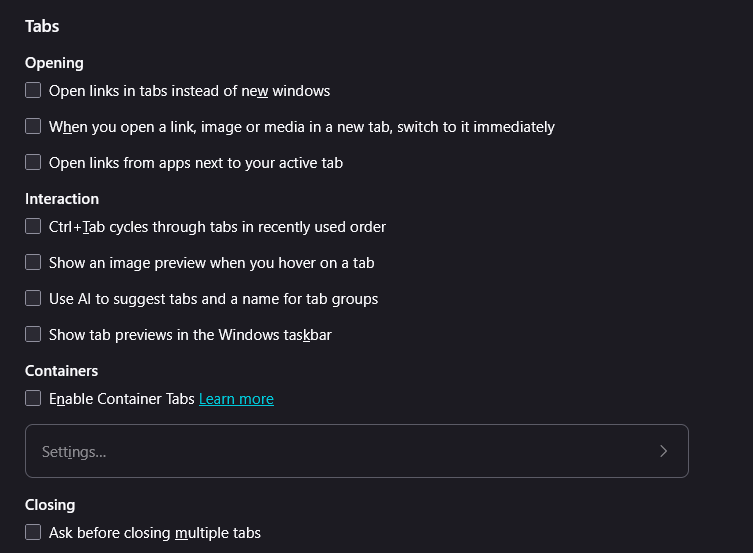
Hyperlinks keep opening in new windows, not in the same/existing window where they were selected. Issue is not unique to Google Search results and occurring across multiple websites. At wits end trying to figure this one out. I have deselected the "Open links in tabs instead of new windows", turned off all extensions, and uninstalled & reinstalled Firefox. Issue is still occurring. Attached is image of my tab selections showing all turned off.
Załączone zrzuty ekranu

Wybrane rozwiązanie

Well, you need to select Open links in tabs instead of new windows so that it opens links in new tabs instead of new windows. With that unchecked, it will keep opening new windows.

If it's still doing it with that checked, causing new windows to open up, might see if some extension is causing it by to Help -> Troubleshoot Mode which will temporarily disable them all. (To get them back, just restart the browser).

Przeczytaj tę odpowiedź w całym kontekście 👍 0

Wszystkie odpowiedzi (3)

Wybrane rozwiązanie

Well, you need to select Open links in tabs instead of new windows so that it opens links in new tabs instead of new windows. With that unchecked, it will keep opening new windows.

If it's still doing it with that checked, causing new windows to open up, might see if some extension is causing it by to Help -> Troubleshoot Mode which will temporarily disable them all. (To get them back, just restart the browser).

Thank you. I did another clean install of Firefox, unchecked everything, then re-selected only Open links in tabs instead of new windows and it now appears to be working properly.

There must be an easier way?

Zadaj pytanie

Aby odpowiadać na posty, musisz zalogować się na swoje konto. Zadaj pytanie, jeśli nie masz jeszcze konta.