


Message pane disappeared

The message pane disappeared. I've got View > Layout > Classic selected, but no matter what I select, all I see are the folder and message list panes. The classic view was working. I have no idea what I did to change the layout.
Wszystkie odpowiedzi (4)
Wybrane rozwiązanie
Try pressing F8
Thanks. F8 did not work, but I eventually found a menu with a "Message pane" option. I clicked on it and the pane showed up.
Are you saying the shortcut for the menu entry you say you used does not work?

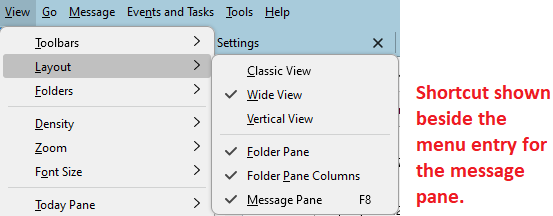
F8 did not work. I fixed it by selecting View > Layout > Message Pane. When I installed Thunderbird the menu bar containing "View" was hidden. It took a while, but i found out that menu bar could be selected to appear.
It would help if the Thunderbird User Guide had a searchable table of contents and index. As it is, it is very difficult to find information.