


Inbox data file is scrambled, not plain-text

This Inbox file (no file extension) was saved from a Windows 7 computer and I tried to import after a Windows 10 upgrade to the following location: C:/Users/User/AppData/Roaming/Thunderbird/Profiles/sswec4of.default/Mail/mail.twc.com/
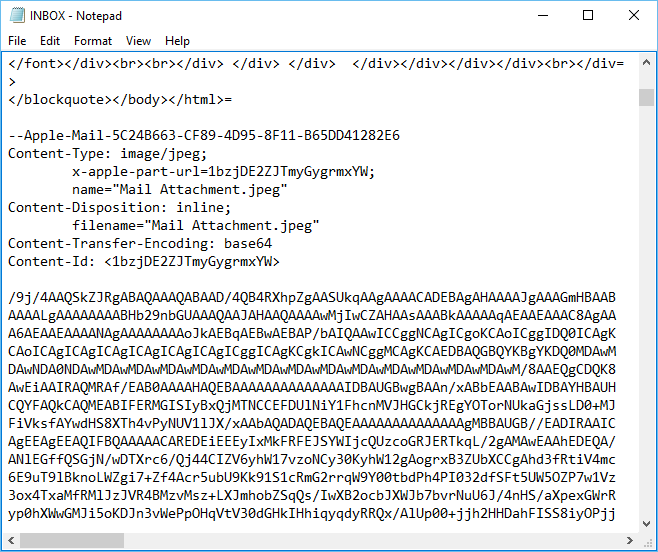
I however don't see any of the old emails in Thunderbird and when opening up the Inbox file with Notepad I see just the HTML code for a few NEW emails and then a lot of scrambled text that appears to be the OLD emails. The attached pic shows this transition near the middle.
Any idea if the emails are supposed to be scrambled? And how do I retrieve the emails from this? Maybe an older Thunderbird version used that format? Any ideas?
Thanks!!
Zmodyfikowany przez egeier w dniu
Wszystkie odpowiedzi (5)

I tried to import
Please explain in detail what that means.
The format of the mail files hasn't changed.
After I setup Thunderbird with a email address, I simply replaced the new default Inbox file with the old one in the location I stated. That method ok? Any idea of the scrambled text?
That should work. You may need to rebuild the index file for Inbox. Right-click Inbox - Properties - Repair Folder
The 'scrambled text' is a JPG picture attached to one of the messages.
I did the Repair Folder option; didn't help.
Yeah that picture shows part of a NEW email and then I think the OLD emails in the scrambled text that goes on for the remaining of the file.
the scrambled text that goes on for the remaining of the file.
That would indicate there are no further messages, just the JPG attachment.