


Font in svg file

I create a svg file with php which includes a dynamic text. Therefore I have embedded the used font with <glyph>.... This works fine with Chrome, but Firefox uses the standard font. How can I use an embedded font in the svg file?
Thanks in advance Manuel
Wybrane rozwiązanie
Firefox can't handle two different fonts in one svg file. That was the problem.
Thanks for your help. Manuel
Przeczytaj tę odpowiedź w całym kontekście 👍 0Wszystkie odpowiedzi (6)
As firefox supports HTML 5 so recreate the file with with proper codings.
Can you link to a page demonstrating the issue?
The MDN documentation on glyph is here: https://developer.mozilla.org/docs/Web/SVG/Element/glyph (I don't see any unusual warnings)
See also:
Zmodyfikowany przez cor-el w dniu
@Sourjobraato Banerjee: Sorry, I didn't get your point. The file was created by Adobe Illsutrator so it should be SVG 1.1 conform.
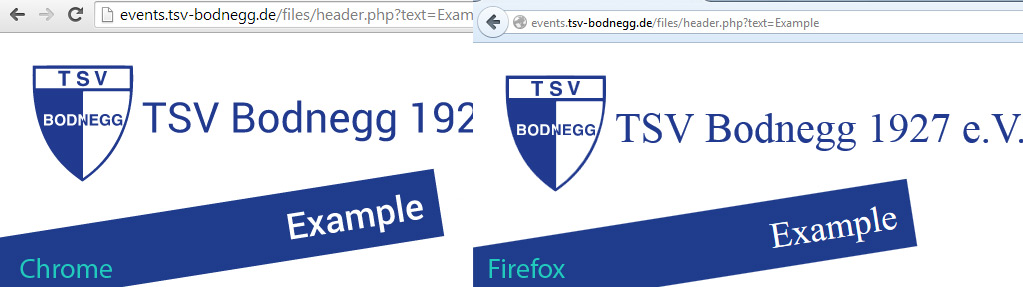
@jscher2000: You can see an example here: http://events.tsv-bodnegg.de/files/header.php?text=Example The text "example" shout be shown in Roboto.
@core-el: The docs say that is not implemented (https://developer.mozilla.org/en-US/docs/SVG_in_Firefox) but the tutorial (https://developer.mozilla.org/en-US/docs/Web/SVG/Tutorial/SVG_fonts) says it should work.
I have an image attached. It should look like the chrome version.
See also:
- http://robert.ocallahan.org/2013/02/svg-in-opentype-new-approach-to-svg.html
- bug 719286 - Implement embedded SVG glyphs in OpenType fonts
Wybrane rozwiązanie
Firefox can't handle two different fonts in one svg file. That was the problem.
Thanks for your help. Manuel