Denne tråden ble arkivert.
Still et nytt spørsmål dersom du trenger hjelp.

Solved
Arkivert
How do I disable Firefox as default on Mac OS 10.6 Snow Leopard

Accidentally checked use as default browser and want to remove this. Use Safari regularly and now cannot disable default for Firefox.
Thanks.
Accidentally checked use as default browser and want to remove this.
Use Safari regularly and now cannot disable default for Firefox.
Thanks.
All Replies (2)
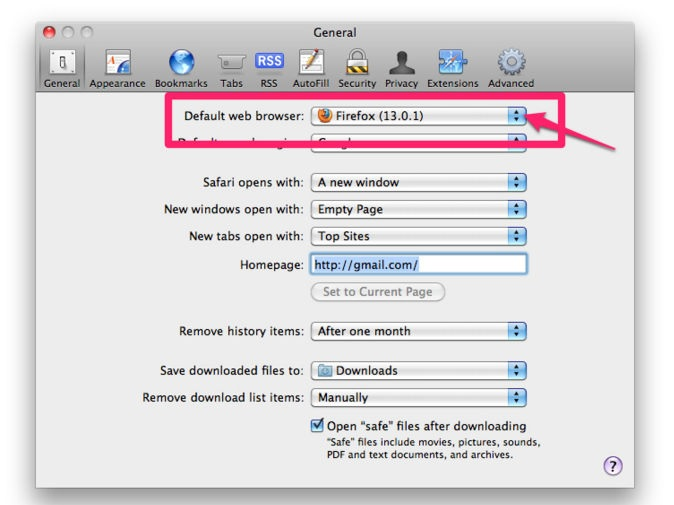
Did you try to set Safari as the default browser in the Safari preferences?
- Safari > Preferences > General > Default Web Browser
Make sure to remove the tick here:
- Firefox > Preferences > Advanced > General : System Defaults
Valgt løsning
1. Open Safari (/Applications).
2. From the Safari menu, choose Preferences.
3. Click the General button.
4. Choose your desired browser from the "Default web browser" pop-up menu.
(See the screenshot)