


Thunderbird is "adding" a URL to the front of normal URLs in mails: "https://chromeupdate.co/?url=" followed by the original URL in the email.
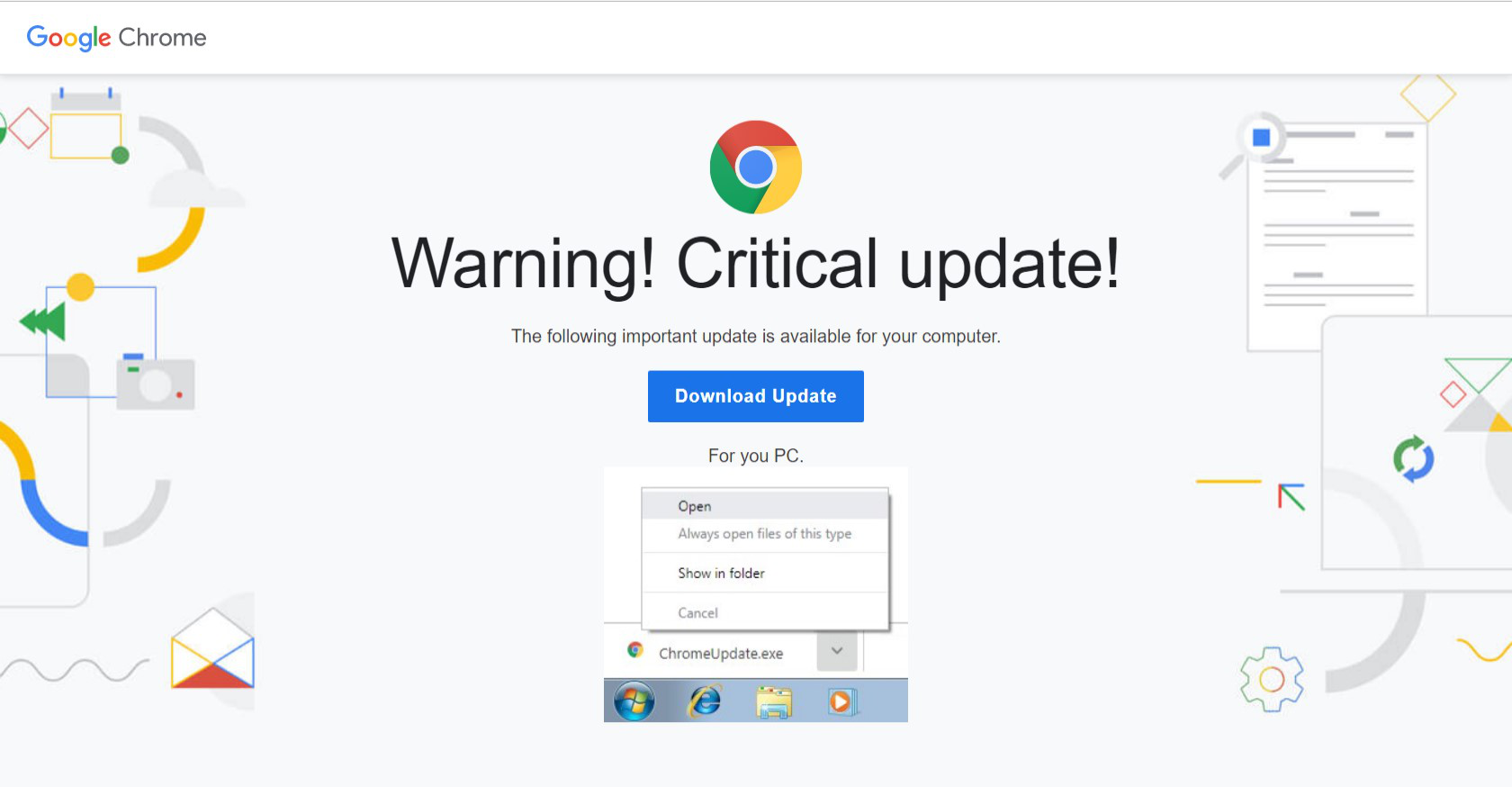
The web page it goes to says there's "Warning! Critical update! The following important update is available for your computer." and then gives a link to "https://chromeupdate.co/ChromeUpdate.exe". I can't find anything to indicate why this is happening.
I have NOT clicked the link provided. Image of the web page attached.
This has happened with links in emails from various sources and seems to happen after receiving the email. When I first receive the email, the links are normal, but seem to be amended at some point while it's in my inbox. The added URL is put into every URL in the email. It only appears to affect one email in my inbox, . The ".co" extension is Columbia, pretty sure Google isn't sending me urgent updates from a Columbia office.
I've run Spyware S&D, MalwareBytes, and AVG with no results that would explain/fix the problem.
Valgt løsning
Well, removing Thunderbird using Revo Uninstall and then re-installing appears to have cleared the issue. None of my emails show the addition to the front of URLs since doing so.
None of the anti-malware software I tried found anything on my system.
Unfortunately, I didn't have the opportunity to view source code (Cntl U) or start up in safe mode.
Matt, thanks for your suggestions.
All Replies (6)
Sounds like you have some sort of malware.
My attempt to go to the URL you listed resulted in a block on the site as dispensing malware from my anti virus (ESET),
To check if google chrome has updates, go to this link, When in chrome paste this link into the address bar and press enter. There are apparently some urgent updates out in November that perhaps this is an exploit for. So check it is up to date.
chrome://settings/help
This link talks about removing malware and adware in particular. the use of adwcleaner is a step you have not mentioned taking. https://malwaretips.com/blogs/remove-fake-urgent-chrome-update-virus/
I have tried all the suggested processes in the link you provided. ADWCleaner found a bunch of stuff, but none that seemed connected to this. MalwareBytes and HitmanPro found nothing either.
The problem isn't Chrome pop-ups, it's URLs in emails in Thunderbird that are being changed to add the lead-in to the regular URL. It adds it to every URL in the given email and only appears to do so in one email at a time. If I delete the affected email, the issue doesn't return right away, but later a new/different email suddenly has the amended URLs and it starts all over.
Going to try a complete uninstall of Thunderbird using Revo Uninstaller and see if that clears the issue.
Thanks for your reply, I'm certainly not in my element here...
Endret av MONTY5
MONTY5 said
Going to try a complete uninstall of Thunderbird using Revo Uninstaller and see if that clears the issue.
lots of posts here about revo deleting mail and contacts. They are after all local. So I actually don't recommend it's use.
Now you say the emails are changed.
Hover the mouse over the link, does the link shown in the bottom on the status bar show the added bit, I do not think it will. But like all diagnostic processes you go by the numbers.
Right click the link in Thunderbird and select copy link location. Open Firefox and right click the location bar and select paste. did you get the original link or the modified one? (paste, not paste and go as what gets pasted in is what we want to look at.
If you press Ctrl+U the message source will open. You do not have to be familiar with that to search for the added bit on the link (ctrl+F). I do not think you would see it in the message source. But we have to eliminate that.
Then the next step is running Thunderbird in safe mode (Help menu > restart with add-ons disabled) Continue when prompted. Can you reproduce your issue when in safe mode.
Finally running your computer without most of the installed software that might be doing this.
- Restart the operating system in safe mode with Networking. This loads only the very basics needed to start your computer while enabling an Internet connection. Click on your operating system for instructions on how to start in safe mode: Windows 10, Windows 8, Windows 7, Windows Vista, Windows XP, OSX
- If safe mode for the operating system fixes the issue, there's other software in your computer that's causing problems. Possibilities include but not limited to: AV scanning, virus/malware, background downloads such as program updates, or my favorite for you. Adware that is adding to the windows processing of links. Thunderbird passes links to windows to open them and it selects the default browser and passes them off to the browser. It is this windows process I think is at issue.
Yes, when I hover over the URL in Thunderbird, the "added" pre-URL shows in the full link in the lower left. I could see it there and copy link also got the amended URL.
I already used Revo, first using MozBackup to save emails and settings. Reinstalling Thunderbird went smoothly and all my settings and emails were restored using the backup.
I'll have to wait and see if the issue resurfaces. I deleted the most recent amended email before the uninstall. Currently not seeing the amended URL issue, but as I said, it doesn't seem to happen right away.
I'll post an update if it happens again and if any of my current or new emails do it again, I'll try some of your other suggestions.
Thanks.
just another note of warning for the future. Mozbackup has not been supported by it;s author or updated for many years. it's ongoing ability to backup profiles has been drawn into question, including by it's original author.
Valgt løsning
Well, removing Thunderbird using Revo Uninstall and then re-installing appears to have cleared the issue. None of my emails show the addition to the front of URLs since doing so.
None of the anti-malware software I tried found anything on my system.
Unfortunately, I didn't have the opportunity to view source code (Cntl U) or start up in safe mode.
Matt, thanks for your suggestions.