


I want to download Pod casts, can someone help me?

like many others I have been unable to save pod-casts, they just open and start playing. I have tried a long tap and right clicking on the link, there is no 'save' option. I have set all the MP3 options in tools to 'always ask', no luck there either (I also tried 'save'). In the about;config page I changed the media.windows-media-foundation.enabled. to 'false', it stopped the pod-cast playing but didn't help with saving or downloading it. I'm using a windows PC which I am getting increasingly tempted to hit with something large and heavy so any help or new suggestions would be much appreciated
moderator edited the title of this thread
Bewerkt door the-edmeister op
Gekozen oplossing
hello, firefox 21 now makes use of the codecs that are included in your OS that enable it to directly play mp3 & mpeg files (also for html5 videos). in order to disable that, enter about:config into the firefox address bar (confirm the info message in case it shows up) & search for the preference named media.windows-media-foundation.enabled. double-click it and change its value to false.
another way to download the files without tweaking the preference mentioned above would be to right-click the link that leads to a mp3 file or right-click the player in firefox and choose to download the file like that...
Dit antwoord in context lezen 👍 2Alle antwoorden (5)
Gekozen oplossing
hello, firefox 21 now makes use of the codecs that are included in your OS that enable it to directly play mp3 & mpeg files (also for html5 videos). in order to disable that, enter about:config into the firefox address bar (confirm the info message in case it shows up) & search for the preference named media.windows-media-foundation.enabled. double-click it and change its value to false.
another way to download the files without tweaking the preference mentioned above would be to right-click the link that leads to a mp3 file or right-click the player in firefox and choose to download the file like that...
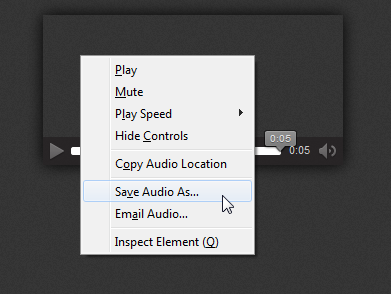
Thank you Phillip, I'd tried the others to no avail but your last suggestion does the trick in a round about way, much appreciated.
you're very welcome - thanks for reporting back!
I am using firefox 26 and am having this same problem and have tried all the following solutions in the original post. It's very frustrating because all I get is an option to pause or un-pause. I can't even figure out how to save the pod cast anymore. Clicking the MP3 download link for the pod cast gives me the same thing, Auto-Play.
By the way, when I right click all I get is a open link, bookmark link, and save or copy link, I also get a Inspect Element. When I right click on the player which is nothing but a black screen, I just get back, reload, bookmark this page, save page as, view page info, and inspect element. Please help.
OK, I got the save audio thing by right clicking in the correct spot. There has got to be a better way though.
Bewerkt door gooseman80 op