


How do I export Bookmarks to Chrome?

I cannot find a way to export my current list of firefox bookmarks to Chrome, has anyone found a way to do it?
Gekozen oplossing
OK. Here's another way to do it:
-> Export your Firefox Bookmarks
- Export Firefox bookmarks to an HTML file to back up or transfer bookmarks
- Save the .html bookmarks file
Open Google Chrome
- click the Customize and Control Google Chrome button -> go to Bookmarks section and click Bookmarks Manager
- Import Bookmarks Manager window will appear
- click the Organize button and click Import Bookmarks from HTML file
- provide the location of the earlier saved .html bookmarks file and click Open
Check and tell if its working.
Dit antwoord in context lezen 👍 2Alle antwoorden (6)
Open Google Chrome
- click the Customize and Control Google Chrome button (a tool-like icon as shown in attached screenshot) -> go to Bookmarks section and click Import Bookmarks and Settings...
- Import Bookmarks and Settings... window appears -> in the From field select Mozilla Firefox -> under select Items to import: place checkmark on Favorites/Bookmarks -> click Import button
Check and tell if its working.
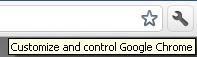
Bewerkt door Hasan op
I tried that, when I did the only things that came up in the field area was Microsoft Inernet Explorer and Google Toolbar, Firefox was not available for selection.
Gekozen oplossing
OK. Here's another way to do it:
-> Export your Firefox Bookmarks
- Export Firefox bookmarks to an HTML file to back up or transfer bookmarks
- Save the .html bookmarks file
Open Google Chrome
- click the Customize and Control Google Chrome button -> go to Bookmarks section and click Bookmarks Manager
- Import Bookmarks Manager window will appear
- click the Organize button and click Import Bookmarks from HTML file
- provide the location of the earlier saved .html bookmarks file and click Open
Check and tell if its working.
That one worked, thanks for your help.
To help other users find solutions, click on the "Solved It" button Next to the Reply that BEST solved your Question
DO NOT click "Solved It" next to this reply
Bewerkt door Hasan op
solved it.