


I just installed Firefox 5. How can I remove the Bing search from the address bar? I don't want to see Bing at all.

I just installed Firefox 5. How can I remove the Bing search from the address bar. I don't want to see Bing at all. I tired the Firefox options, right-clicking on the search field and the toolbar selection drop-down but could not find a way to get rid of that unwanted search window.
Alle antwoorden (2)
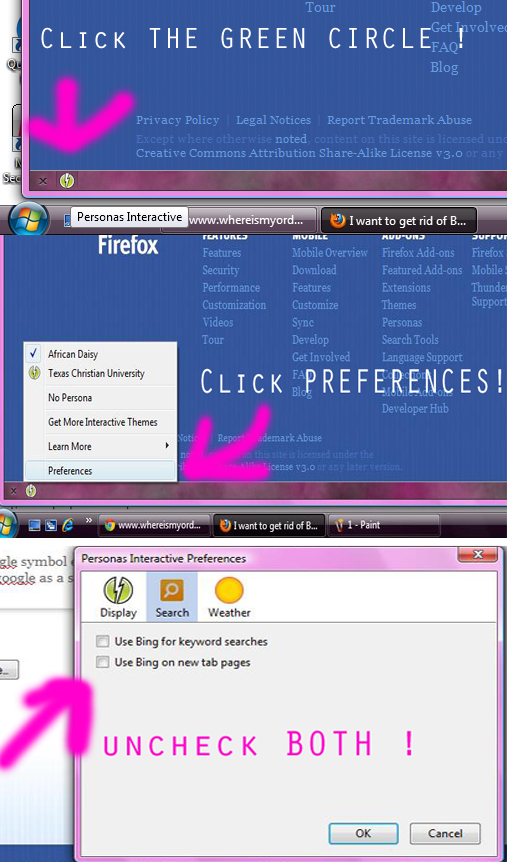
- at the bottom of firefox there is a weird looking greenish circle with a lightning bolt in it*
1. click it and hover over to PREFERENCES. 2. click the second circle that say's BING. 3. Un-check both boxes. 4. you're done :)
Note: it's not going to show the google symbol encrypt when you open a new tab it's just going to automatically use google as a search engine.
See this support posting about getting rid of Bing:
https://support.mozilla.com/en-US/questions/707519#answer-110461
Bewerkt door the-edmeister op
This question has been locked because the original author has deleted their account. While you can no longer post new replies, the existing content remains available for reference.