Tags and Unified Toolbar

Thunderbird 115.6.1 - Windows 11
1. Unified Toolbar is vertical and on the left side of the screen. I can't find any way to make it appear at the top like a normal toolbar. Am I missing something?
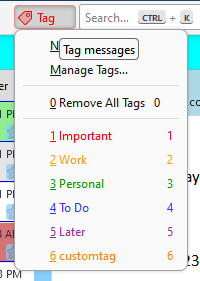
2. I'd like to add Tags to the Toolbar (even if it has to stay on the left). Went to Toolbars/Customize - it added Tags to the Search toolbar, but it doesn't seem to do anything - grayed out
Thanks
Thunderbird 115.6.1 - Windows 11
1. Unified Toolbar is vertical and on the left side of the screen. I can't find any way to make it appear at the top like a normal toolbar. Am I missing something?
2. I'd like to add Tags to the Toolbar (even if it has to stay on the left). Went to Toolbars/Customize - it added Tags to the Search toolbar, but it doesn't seem to do anything - grayed out
Thanks
Alle antwoorden (1)
Does the same thing happen in safe/troubleshoot mode (hold Shift when launching TB)? If it looks correct in safe mode, launch again in safe mode, 'reset toolbars & controls', 'make changes & restart'. See the attached picture with the Tag button on the Unified bar (and working).