


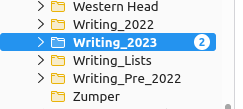
Folder shows "Unread" messages, but none are shown inside

I use multiple folders and subfolders in TB. Since the major update a month ago things have gone strange. 115.3.1 (64-bit) on Mint Linux.
Repeatedly a top level folder (in this case "Writing_2023") will be bolded, showing that there are unread messages.
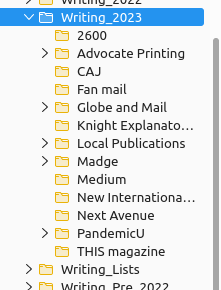
When I click the folder, there will be no sign of an unread message in any of the lower level folders. They are not bolded.
None of the subfolders contain an unread message. Restarting TB makes no difference. My Android phone (using Fairmail) does not exhibit this problem.
Images below.
Thanks folks. Barry
Alle antwoorden (3)
Followup: Just discovered that if I right click the top folder and select "Mark Folder Read" the unread messages will suddenly appear in folders below. I hope this wasn't the intended behaviour! :)
Appalbarry said
Followup: Just discovered that if I right click the top folder and select "Mark Folder Read" the unread messages will suddenly appear in folders below. I hope this wasn't the intended behaviour! :)
I also have the same problem, but the solution you mentioned did not solve my problem
Now the inbox folder says you have an unread message, while I searched all the folders of all the accounts and clicked "Mark Folder Read", but this problem still exists.
Folder mode is set on unfied folders
Does anyone know the solution to this problem?