


Windows 10 bereikte EO (einde ondersteuning) op 14 oktober 2025. Als je Windows 10 gebruikt, lees dan dit artikel.

Windows 10 reached EOS (end of support) on October 14, 2025. If you are on Windows 10, see this article.

Zoeken in Support

Vermijd ondersteuningsscams. We zullen u nooit vragen een telefoonnummer te bellen, er een sms naar te sturen of persoonlijke gegevens te delen. Meld verdachte activiteit met de optie ‘Misbruik melden’.

Meer info

Deze conversatie is gearchiveerd. Stel een nieuwe vraag als u hulp nodig hebt.

Juust about had it with this browser...

  • 2 antwoorden
  • 0 hebben dit probleem
  • 44 weergaven
  • Laatste antwoord van cor-el

Little frustrated, tired of trying to figure it out myself, because I'm getting nowhere. So, at first I thought my issue was Firefox Nightly. It wouldn't update saying my OS was out of date...(Windows 11) Ok, I updated manually for awhile. still wont update on its own, I try going to the normal stable firefox browser, same freaking issue on TWO computers! Firefox wont update saying my OS is out of date. One computer has Windows 10, one Windows 11. I have seriously had it with this browser. Instead of wasting my time being spun by the support on this site why don't I just go find myself a browser that doesn't get confused by my OS..
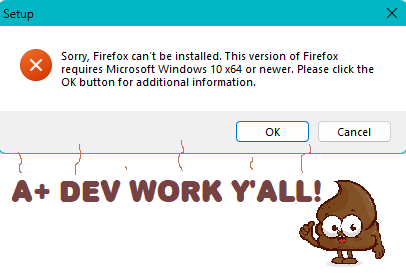
Little frustrated, tired of trying to figure it out myself, because I'm getting nowhere. So, at first I thought my issue was Firefox Nightly. It wouldn't update saying my OS was out of date...(Windows 11) Ok, I updated manually for awhile. still wont update on its own, I try going to the normal stable firefox browser, same freaking issue on TWO computers! Firefox wont update saying my OS is out of date. One computer has Windows 10, one Windows 11. I have seriously had it with this browser. Instead of wasting my time being spun by the support on this site why don't I just go find myself a browser that doesn't get confused by my OS..
Gekoppelde schermafbeeldingen

Alle antwoorden (2)

All NSIS installers use the same method to check the Windows version, so you should expect other applications to similarly fail to install.

Open the regedit application and check the following registry key values:

HKEY_LOCAL_MACHINE\SOFTWARE\Microsoft\Windows NT\CurrentVersion

CurrentVersion CurrentMajorVersionNumber

Check that you do not run Firefox in compatibility mode. You can open the Properties of the Firefox desktop shortcut via the right-click context menu and check the "Compatibility" tab. Make sure that all items are deselected in the "Compatibility" tab of the Properties window.