

Deze conversatie is gearchiveerd.
Stel een nieuwe vraag als u hulp nodig hebt.

Opgelost
Gearchiveerd
URL bar custom search engines - only click once

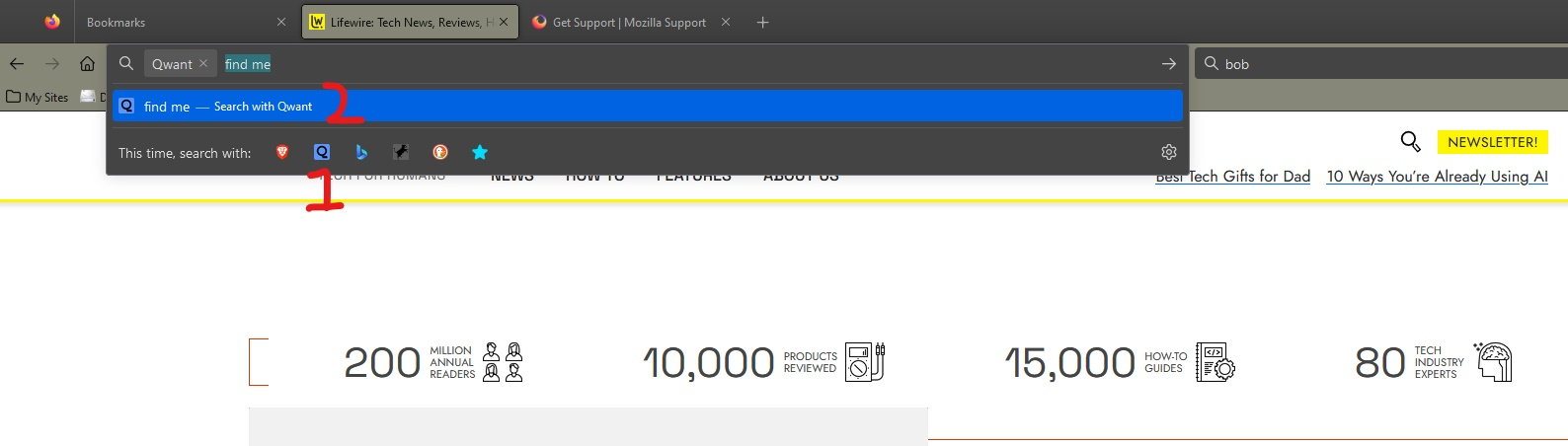
When using custom search engines:
In the search bar, all you have to do is click once on the engine icon and it searches. In the URL bar you have to select the search engine icon and then click "search with".
Is there a way to eliminate the second click in the URL bar?
Thanks.
Windows 10, Firefox 114.0.1
When using custom search engines:
In the search bar, all you have to do is click once on the engine icon and it searches. In the URL bar you have to select the search engine icon and then click "search with".
Is there a way to eliminate the second click in the URL bar?
Thanks.
Windows 10, Firefox 114.0.1
Alle antwoorden (4)

Gekozen oplossing
Shift-Click the icon. Or click it and press Enter.
You can also initiate the search by typing an '@' and select the search engine.
Thanks, that's helpful.
I was hoping something like an about:config hack, but I'll mark it solved.
You can set a (one-letter) keyword to a search engine by double-clicking the keyword column on the "Settings -> Home" page and type this keyword and a space to use this search engine.