


Windows 10 bereikte EO (einde ondersteuning) op 14 oktober 2025. Als je Windows 10 gebruikt, lees dan dit artikel.

Windows 10 reached EOS (end of support) on October 14, 2025. If you are on Windows 10, see this article.

Zoeken in Support

Vermijd ondersteuningsscams. We zullen u nooit vragen een telefoonnummer te bellen, er een sms naar te sturen of persoonlijke gegevens te delen. Meld verdachte activiteit met de optie ‘Misbruik melden’.

Meer info
Deze conversatie is gearchiveerd. Stel een nieuwe vraag als u hulp nodig hebt.
Gearchiveerd

Your browser is managed by your organization.

Terry beantwoord
Geert

Dear community,

In the privacy and security settings of my Firefox browser at the top of the page, there is the following message: "Your browser is managed by your organization.". (image added) But this is on my private laptop, so I don't know which organization this could be.

When I click on "Your browser is managed by your organization", than a new tap opens named "company policy rules" (image added). But I can't find which organization.

On my laptop I have a Microsoft 365 family account, but no school- or work account. Once I installed Teams on my laptop with the credentials of my work account. But I uninstalled Teams later and I can't find any traces of my work account on my laptop.

In the Windows settings I also find sometimes the mention that some setting are managed by my organization. But again I don't know which organization.

My questions: - Is it normal to have the message "Your browser is managed by your organization"? - If not, how can I see which organization it is? - And if needed how can I deactivate or remove it?

Thank you in advance. Best regards.
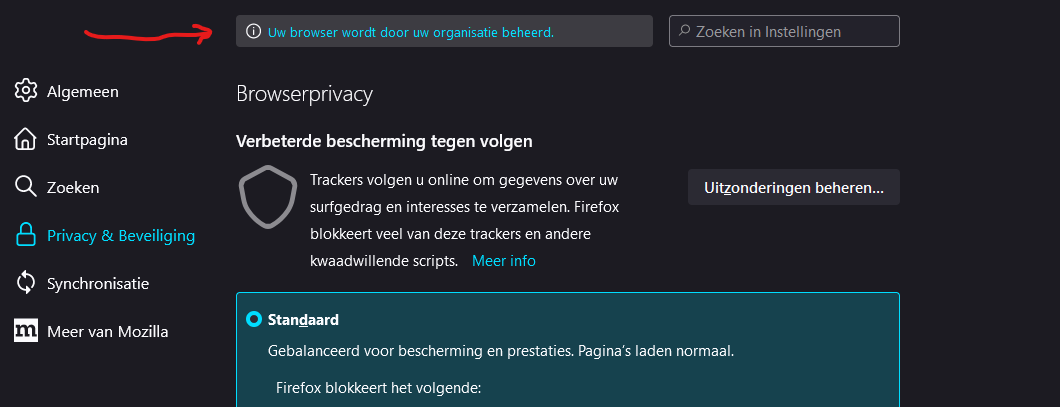
Dear community, In the privacy and security settings of my Firefox browser at the top of the page, there is the following message: "Your browser is managed by your organization.". (image added) But this is on my private laptop, so I don't know which organization this could be. When I click on "Your browser is managed by your organization", than a new tap opens named "company policy rules" (image added). But I can't find which organization. On my laptop I have a Microsoft 365 family account, but no school- or work account. Once I installed Teams on my laptop with the credentials of my work account. But I uninstalled Teams later and I can't find any traces of my work account on my laptop. In the Windows settings I also find sometimes the mention that some setting are managed by my organization. But again I don't know which organization. My questions: - Is it normal to have the message "Your browser is managed by your organization"? - If not, how can I see which organization it is? - And if needed how can I deactivate or remove it? Thank you in advance. Best regards.

Gekoppelde schermafbeeldingen

Alle antwoorden (1)

A policy document has been filed in your OS, quite likely by security software.

https://support.mozilla.org/en-US/kb/customizing-firefox-using-group-policy-windows