


Tabs appear in different windows and not just in 1
When I am in 1 window, I have multiple tabs open, but when I hover over the Firefox logo in my taskbar, the tabs appear in different windows that have each tab but not the other tabs from the window I am on. Like every individual tab has its own window. This has never happened to me before, only started happening today.
Gekozen oplossing
Hi Grim, could you check the following setting, or I guess I mean un-check the following setting if it's checked.
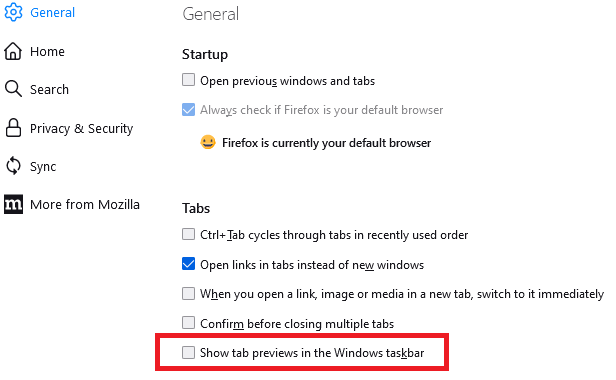
On the Settings page, in the Tabs section, make sure that "Show tab previews in the Windows taskbar" is NOT checked.
Dit antwoord in context lezen 👍 0

Alle antwoorden (2)
Gekozen oplossing
Hi Grim, could you check the following setting, or I guess I mean un-check the following setting if it's checked.
On the Settings page, in the Tabs section, make sure that "Show tab previews in the Windows taskbar" is NOT checked.
jscher2000 - Support Volunteer said
Hi Grim, could you check the following setting, or I guess I mean un-check the following setting if it's checked. On the Settings page, in the Tabs section, make sure that "Show tab previews in the Windows taskbar" is NOT checked.
Thank you, that fixed it immediately.