Set background colour of single column in message list

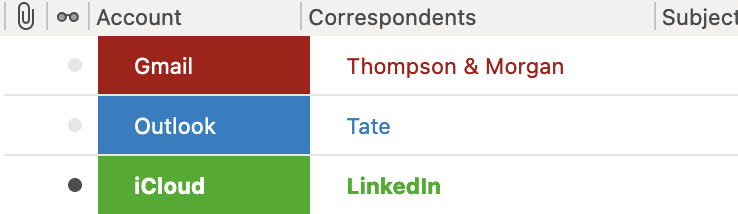
I'd like to be able to customise the background colour of a single column in the messages list, such that I can colour code emails that have been received from different accounts. Is this possible?
I've currently been able to colour code the whole row based on a tag that I apply for each account using the following code in the userChrome.css file:
/*Outlook*/
#threadTree > treechildren::-moz-tree-row(Toutlook){
  background-color: #157cc4  !important;
}
#threadTree > treechildren::-moz-tree-cell-text(Toutlook){
  color: white !important;
}
#threadTree > treechildren::-moz-tree-row(Toutlook, selected){
  background-color: #E07D52 !important;
}
#threadTree > treechildren::-moz-tree-cell-text(Toutlook, selected){
  color: #157cc4 !important;
}
and similar for all the other tags..
Is there any way to customise this further to only apply to one column in the list (e.g. the Account column) rather than colouring the whole row?
Gekozen oplossing
Solved it.
Instead of using treechildren::-moz-tree-row I instead used treechildren::-moz-tree-cell with the property "accountCol" set in addition to the property relating to the Tag, in this case "Toutlook"
/*Outlook*/
#threadTree > treechildren::-moz-tree-cell-text(Toutlook){
  color: #157cc4 !important;
}
#threadTree > treechildren::-moz-tree-cell(accountCol,Toutlook){
  background-color: #157cc4 !important;
}
#threadTree > treechildren::-moz-tree-cell-text(accountCol,Toutlook){
  color: white !important;
}
#threadTree > treechildren::-moz-tree-cell(Toutlook, selected){
  background-color: #157cc4 !important;
}
#threadTree > treechildren::-moz-tree-cell-text(Toutlook, selected){
  color: white !important;
}
Dit antwoord in context lezen
👍 1
Alle antwoorden (1)
Gekozen oplossing
Solved it.
Instead of using treechildren::-moz-tree-row I instead used treechildren::-moz-tree-cell with the property "accountCol" set in addition to the property relating to the Tag, in this case "Toutlook"
/*Outlook*/
#threadTree > treechildren::-moz-tree-cell-text(Toutlook){
  color: #157cc4 !important;
}
#threadTree > treechildren::-moz-tree-cell(accountCol,Toutlook){
  background-color: #157cc4 !important;
}
#threadTree > treechildren::-moz-tree-cell-text(accountCol,Toutlook){
  color: white !important;
}
#threadTree > treechildren::-moz-tree-cell(Toutlook, selected){
  background-color: #157cc4 !important;
}
#threadTree > treechildren::-moz-tree-cell-text(Toutlook, selected){
  color: white !important;
}