


Windows 10 bereikte EO (einde ondersteuning) op 14 oktober 2025. Lees voor meer informatie dit artikel.

Windows 10 reached EOS (end of support) on October 14, 2025. For more information, see this article.

Zoeken in Support

Vermijd ondersteuningsscams. We zullen u nooit vragen een telefoonnummer te bellen, er een sms naar te sturen of persoonlijke gegevens te delen. Meld verdachte activiteit met de optie ‘Misbruik melden’.

Meer info

Deze conversatie is gearchiveerd. Stel een nieuwe vraag als u hulp nodig hebt.

Search Shortcuts keywords don't work in search bar, despite wording of help text

  • 2 antwoorden
  • 1 heeft dit probleem
  • 107 weergaven
  • Laatste antwoord van ud0s62ou

meer opties

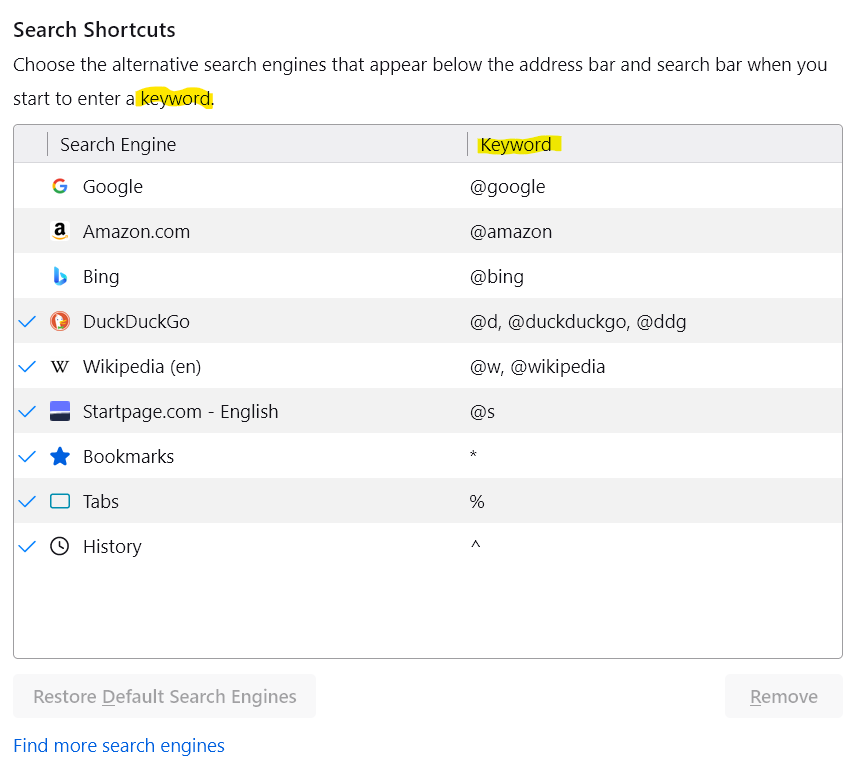
In Settings > Search > Search Shortcuts, the help text currently reads "Choose the alternative search engines that appear below the address bar and search bar when you start to enter a keyword."

This seems to imply that entering keywords into the search bar will bring up alternative search engines. However, this is not the case; only the address bar responds to Search Shortcut keywords, while entering keywords into the search bar will pass the entire string (including keyword) to whichever your default search engine was.

Either the wording has to be modified to clarify that search engine keywords only work when typed into the address bar, or search keyword functionality has to be enabled on the search bar.

In Settings > Search > Search Shortcuts, the help text currently reads "Choose the alternative search engines that appear below the address bar and search bar when you start to enter a keyword." This seems to imply that entering keywords into the search bar will bring up alternative search engines. However, this is not the case; only the address bar responds to Search Shortcut keywords, while entering keywords into the search bar will pass the entire string (including keyword) to whichever your default search engine was. Either the wording has to be modified to clarify that search engine keywords only work when typed into the address bar, or search keyword functionality has to be enabled on the search bar.

Bewerkt door ud0s62ou op

Alle antwoorden (2)

meer opties

With "keyword" they mean "search term".

meer opties

Franz_von_Suppe said

With "keyword" they mean "search term".

Is that so? Then they really need to change the heading of the column in the table below the help text that has the thing you type in to activate the search engine shortcut, because it's labelled "keyword". Very confusing.
Bewerkt door ud0s62ou op