


Windows 10 bereikte EO (einde ondersteuning) op 14 oktober 2025. Als je Windows 10 gebruikt, lees dan dit artikel.

Windows 10 reached EOS (end of support) on October 14, 2025. If you are on Windows 10, see this article.

Zoeken in Support

Vermijd ondersteuningsscams. We zullen u nooit vragen een telefoonnummer te bellen, er een sms naar te sturen of persoonlijke gegevens te delen. Meld verdachte activiteit met de optie ‘Misbruik melden’.

Meer info

Deze conversatie is gearchiveerd. Stel een nieuwe vraag als u hulp nodig hebt.

Where is the magnifying glass icon for the inspector pane?

  • 1 antwoord
  • 1 heeft dit probleem
  • 113 weergaven
  • Laatste antwoord van Kassius
  • Gearchiveerd

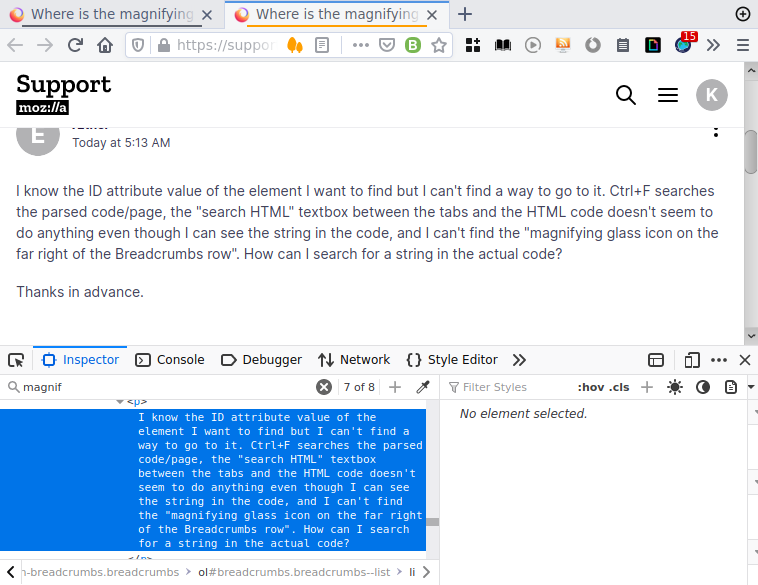
I know the ID attribute value of the element I want to find but I can't find a way to go to it. Ctrl+F searches the parsed code/page, the "search HTML" textbox between the tabs and the HTML code doesn't seem to do anything even though I can see the string in the code, and I can't find the "magnifying glass icon on the far right of the Breadcrumbs row". How can I search for a string in the actual code?

Thanks in advance.

I know the ID attribute value of the element I want to find but I can't find a way to go to it. Ctrl+F searches the parsed code/page, the "search HTML" textbox between the tabs and the HTML code doesn't seem to do anything even though I can see the string in the code, and I can't find the "magnifying glass icon on the far right of the Breadcrumbs row". How can I search for a string in the actual code? Thanks in advance.

Alle antwoorden (1)

Which Firefox version are you using? Here I have a bar just above the HTML in the Inspector with the placeholder "Search HTML." (Firefox 88.0.1 64-bit GNU/Linux.)

EDIT: I would try updating, or refreshing Firefox; my "search HTML" works to search for element ID.

EDIT2: searching for text works as well. Do you have any modifications to the inspector that may be causing this issue?
Bewerkt door Kassius op