


Cursor goes to address bar instead of Google search bar
How can I correct this? It used to default to the Google search bar, but no longer does & all I have done is update Firefox so something in that update did it?
Gekozen oplossing
Okay, I suggest removing the extension and then reinstalling the current release from the Add-ons site. I think the only setting you would lose is the URL for Google, which should be easy to paste back in.
Dit antwoord in context lezen 👍 1Alle antwoorden (12)
Hi magicmanpa, do you use the New Tab Override extension to switch the new tab page from the built-in page to the Google home page? There is a new checkbox to control where the cursor is placed. You have to press Shift+F12 to call up the options panel. See the attached screenshot.
Does that work on yours?
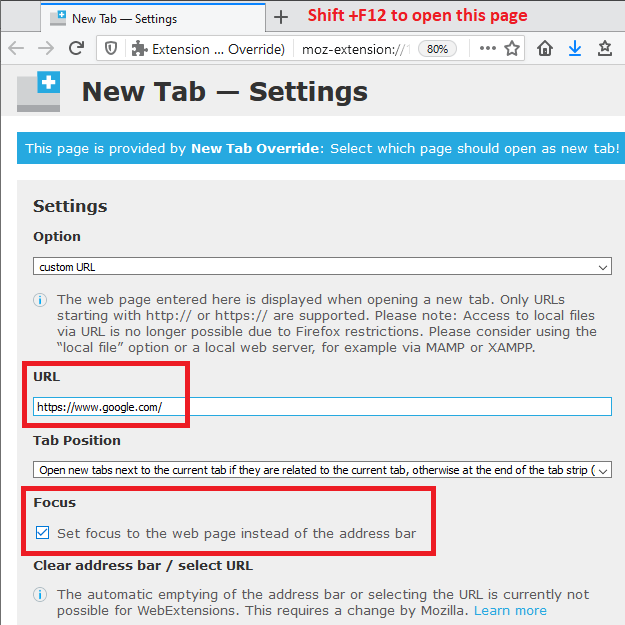
shift+F12 does nothing for me
What extension are you using to change the new tab page to Google? If it doesn't let you put the cursor in the page in Firefox 80, you could remove that one and use New Tab Override instead. (Link in earlier reply.)
I'm using the one you mentioned
I forgot that it also has a toolbar button, if you haven't removed it:
<center> </center>
If you don't have that button, you could check what keyboard shortcut is assigned to it. This article describes how to find that information (and change it, if you like): Manage extension shortcuts in Firefox.

I have that button, but again, there is no check box like you showed for me. Maybe that is for donating users only?
It was added in the August 3rd update. To trigger an extension update, you can click the button with the "gear" or "wheel" or "cog" above your list of extensions and then "Check for Updates". Or I suppose you could do an uninstall/reinstall of the extension.
No updates found
Gekozen oplossing
Okay, I suggest removing the extension and then reinstalling the current release from the Add-ons site. I think the only setting you would lose is the URL for Google, which should be easy to paste back in.
Thanks, that worked.
I have tried all options mentioned above but th ecursor still goes to address bar. After trying theoptions the cusror is gone completely untill i clicksearch box or address bar.....in essence all the so called helpabove has made situation worse. Can anyone help me with my mac. I now havrto click on search box before i get a cursor....really annoying, thankjs

max61, please start a new question: /questions/new