when you see a GIF on Twitter and want to copy the GIF or video and then post it elsewhere, how do u do that so that when I post it just the GIF or video show

Sorry if this is confusing...when you see a GIF or video on Twitter for example and want to copy and post that lets say on Facebook, how do you do that so that just the video or GIF is copied and not the whole tweet? Thanks
Alle antwoorden (4)
Hello, In your address bar type https://twitter.com/Twitter/media replace twitter with user name account like https://twitter.com/mpfrog/media (see bold text) Right click on the image and select copy image location Click on the video and select copy video address Paste it on your FB post Any help? have a nice day !
AnnaSycamore said
Hello, In your address bar type https://twitter.com/Twitter/media replace twitter with user name account like https://twitter.com/mpfrog/media (see bold text) Right click on the image and select copy image location Click on the video and select copy video address Paste it on your FB post Any help? have a nice day !
Thank you!!
Are we talking public images or copyright images?
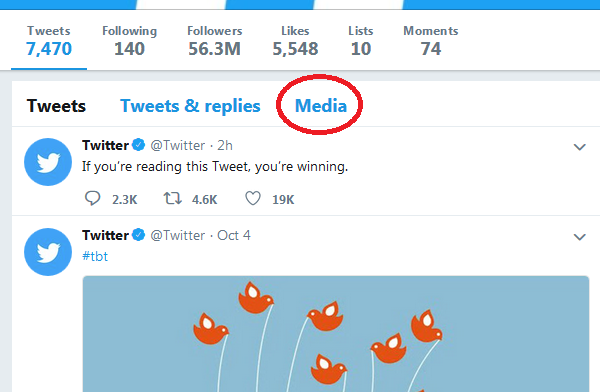
That's kind of a tricky way to get to the Media list. If you don't fancy editing the address bar, you could try the link circled in this screenshot:

If you are already viewing the tweet, try right-clicking the media there.