


wrong characters in mail 2016 (updated)

after reading the excellent post by christ1 (https://support.mozilla.org/en-US/user/christ1) in https://support.mozilla.org/en-US/questions/989709 and trying to apply his suggestions in thunderbird 48, I encountered two problems:
- "main menu bar
- View > Character Encoding > Auto-Detect > set to "Universal""
universal is removed and auto-detect is set to off
- "Tools > Options > Display > Formatting > Advanced
- a) Western Page
- b) On "Fonts For" drop-down menu repeat the procedure for Unicode and Central European.
- c) On "Fonts For" drop-down menu select "User Defined" and repeat the procedure."
"fonts for" (western/Unicode/Central European) option are gone as well
so, how are we supposed to have correct encoding in each and every message without "universal" and "fonts for" settings?
I'm having trouble with some emails not using correct encoding,
thanks in advance
Bewerkt door Matt op
Gekozen oplossing
Update:
Tools > Options > Display > Formatting > Advanced
Select 'Latin' from the 'Fonts for' drop-down menu.
set fonts and sizes as desired tick "Allow messages to use other fonts" tick "Use fixed width font for plain text messages" Outgoing Mail Unicode UTF-8 Incoming Mail Unicode UTF-8 untick 'When possible use the default character encoding in
replies'
Folder Properties
 Select 'Unicode (UTF8)' from the 'Fallback Text Encoding' drop-down
 menu
 untick 'Apply encoding to all messages ...'
Dit antwoord in context lezen 👍 0
Alle antwoorden (6)

Gekozen oplossing
Update:
Tools > Options > Display > Formatting > Advanced
Select 'Latin' from the 'Fonts for' drop-down menu.
set fonts and sizes as desired tick "Allow messages to use other fonts" tick "Use fixed width font for plain text messages" Outgoing Mail Unicode UTF-8 Incoming Mail Unicode UTF-8 untick 'When possible use the default character encoding in
replies'
Folder Properties
 Select 'Unicode (UTF8)' from the 'Fallback Text Encoding' drop-down
 menu
 untick 'Apply encoding to all messages ...'
nope, doesn't work, I've been trying to solve this for a week and I'm a programmer myself, here's what happens: e.g. there's a message that displays correctly only using greek-iso, when selecting encoding from the meny for that particular message only, but when selecting greek-iso from the folder properties (and ticking the apply option too) or using the formatting option you're suggesting, the message still displays in western unicode somehow!!
sorry, when forcing it to apply greek-iso to all the messages of the folder it displays correctly, but that way other messages don't of course (i.e. written in unicode), so that's not an option, so the formatting option isn't working properly I guess
At the heart of this is you have an email which is not correctly formatted and are trying to find a workaround. Really the issue is with the sender. not the receiver.
Thunderbird will respect a valid encoding in the email, or should. Mozilla do keep changing the character sets, but I see nothing specific for Greek recently in Bugzilla.
For example email from this forum includes
MIME-Version: 1.0
Content-Type: text/plain; charset="utf-8"
Content-Transfer-Encoding: 7bit
for the text copy of the email and
MIME-Version: 1.0
Content-Type: text/html; charset="utf-8"
Content-Transfer-Encoding: 7bit
For the HTML version of the email.
What does you problem email offer in that regard?
Bewerkt door Matt op
yes, that's what I though, there's also this parameter: the encoding the sender sends, but it's not only one email, the email served as an example, the truth is however that the emails I'm referring to are rather older ones, newer ones seem to be working better if not fine,
anyway, the problematic one is MIME-Version: 1.0 Content-Type: text/plain; charset=iso-8859-1 Content-Transfer-Encoding: 8bit, which makes sense since the sending email tells thunderbird to treat the email as western,
and the settings that seem to work of me are
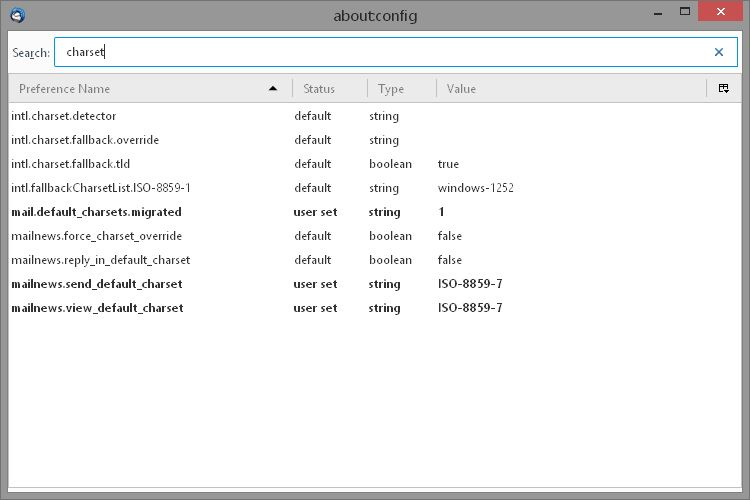
all in all, I noticed that encoding is switching from greek-iso to utf-8 even in a single folder (I guess that's because the sender tells thunderbird which encoding to use), but I was hoping there could be a way to switch automatically from sending mails encoded with western/iso-8859-p1 to greek-iso or utf-8