


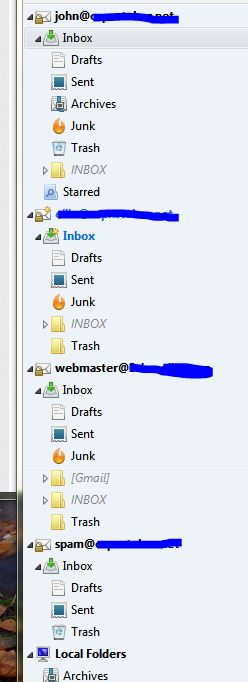
Some accounts have Trash Folder instead of Trash icon. Can't perform "Empty Trash" on the folder, only on a Trashcan icon.

I have four accounts open in TB: mine, wife's, club, and spam. Only mine and the spam account show the trashcan icon. The other two accounts have a folder named "Trash". Deleted files go into the Trash folders the same is in the trashcan icon folders. However, there is one action I can't perform on the Trash folders. When right-clicking the folders, "empty trash" is not an available option. The function is only available on the folders with the trashcan icon. Is there a way to get the appropriate Trash folder with "empty trash" function in all accounts?
Gekozen oplossing
OK - I messed around with Settings some more and stumbled upon a solution. 1. Right-click on account name in left pane and select Settings. 2. Select Server Settings 3. In the middle block under Delete actions, select Advanced 4. Deselect "Show Only Subscribed Folders" and click OK 5. Click OK in Settings and then collapse Account name in left pane so no sub-folders are showing. 6. Expand Account name. Voila - The Trash folder is now a trashcan with the "Empty Trash" function. 7. If desired, return to Advanced settings and re-select "Show Only Subscribed Folders" and click OK
Don't ask me why this works. It's a total fluke that I even found it.
Alle antwoorden (7)
Are these IMAP accounts?
Yes, these are IMAP?
It may well be that the server calls the trash something else. Like Deleted or Deleted items.
So first up right click the account in the folder pane and select subscribe. Is there a folder that looks like it should be the deleted folder with another variant of the name or even in another Language. Müll is trash in German for example? If there is;
- Subscribe to it.
- Right click the account again, select settings and in the accounts server settings section change the folder used to move mail to when you delete it.
I checked the server settings and the subscriptions. The accounts other than "john@...." all have Trash folders, no trashcan icon. There is no trashcan icon as a selectable item under "When I delete a message...Move it to this folder..."
Gekozen oplossing
OK - I messed around with Settings some more and stumbled upon a solution. 1. Right-click on account name in left pane and select Settings. 2. Select Server Settings 3. In the middle block under Delete actions, select Advanced 4. Deselect "Show Only Subscribed Folders" and click OK 5. Click OK in Settings and then collapse Account name in left pane so no sub-folders are showing. 6. Expand Account name. Voila - The Trash folder is now a trashcan with the "Empty Trash" function. 7. If desired, return to Advanced settings and re-select "Show Only Subscribed Folders" and click OK
Don't ask me why this works. It's a total fluke that I even found it.

Your solution did not work for me. Any other ideas?
In my case, one day when I opened TBird the Trash icon suddenly changed to the Junk icon and even if I direct trash to that folder, it does not go there but rather is directly deleted (my settings call for it to go to Junk folder, not to be deleted). Junk also goes to this folder and can be deleted by clicking on "Empty Junk." However, the Trash folder is a normal folder with the normal folder icon and does not allow "Empty Trash."
Subscribing/unsubscribing, changing server settings, and collapsing expanding have no effect.
Thoughts?
ckbks said
Your solution did not work for me. Any other ideas?
Perhaps wait for someone to answer your question instead of spamming. https://support.mozilla.org/en-US/questions/1067722
I will lock this question to prevent further spam on this thread.