


I have a filter menu across the top of my mail instead of reply, forward, etc.
The menu bar above my mail now has a filter menu. I don't know how it got there. I need the regular menu bar that lets you reply, forward, etc.
Alle antwoorden (3)
Please provide us with a screenshot. If you need help to create a screenshot, please see How do I create a screenshot of my problem?
Once you've done this, attach the saved screenshot file to your forum post by clicking the Browse... button below the Post your reply box. This will help us to visualize the problem.
Thank you!

Quote fm Snooker: The menu bar above my mail now has a filter menu. I don't know how it got there. I need the regular menu bar that lets you reply, forward, etc.
See attached screenshot of the problem that I wish to 'revert' to a regular menu bar.
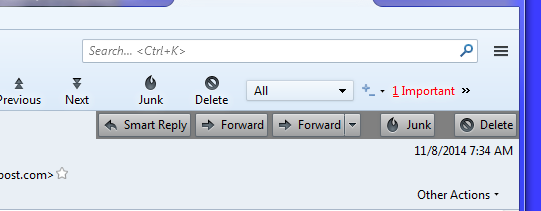
I see two lines of the application tool bar and one list of the mail toolbar. Have you installed an add-on, like conversations at some point?
Or are you genuinely seeking the menu... right click the toolbar (beside the Ctrl+K text box) and select menu bar.