


why are crash reports being submitted when the Enable Crash Reporter option is not checked

In trying to view what was going on with a crash I checked in about:crashes. This led to a list of links with a date and time titled Submitted Crash Reports. Clicking on one leads me to a link with all the details at https://crash-stats.mozilla.com. Why isn't this information on my machine rather than your site?
I do not have the Crash Reporter enabled. It would seem Firefox is ignoring my settings and sending these to you. Why?
Alle antwoorden (2)

The crash reports are definitely at Mozilla as well. You have a record of what has been sent, when and what that report is about so you know about your crash as Mozilla is about being open. Your report will reach a developer or somebody eventually.
However, if you would love us to investigate and help you troubleshoot your crashing, please follow these steps:
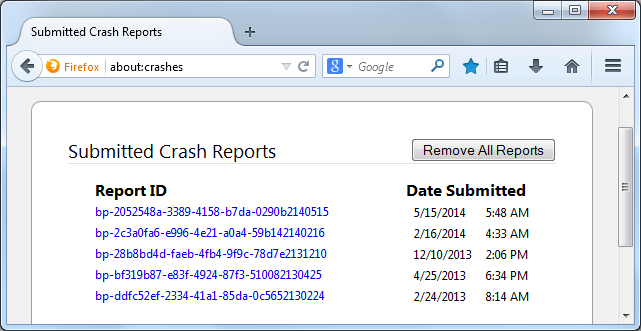
- Enter about:crashes in the Firefox address bar and press Enter. A Submitted Crash Reports list will appear, similar to the one shown below.
- Copy the 5 most recent Report IDs that start with bp- and then go back to your forum question and paste that into the "Post a Reply" box.
Thank you for your help!
More information and further troubleshooting steps can be found in the Troubleshoot Firefox crashes (closing or quitting unexpectedly) article.

Please update your Shockwave Flash