


Windows 10 reached EOS (end of support) on October 14, 2025. If you are on Windows 10, see this article.

Search Support

Avoid support scams. We will never ask you to call or text a phone number or share personal information. Please report suspicious activity using the “Report Abuse” option.

Learn More
Archived

Address Book Importing

Tim Marciniak

Hi, I'm a MTB newbie Version 115.11.1 and am just trying to import my comcast.net address book from CSV. MTB seems to be totally confused about the columns. I'd be happy to adjust the column assignments, as I think I'm supposed to, but it won't let me. The automatically selected column name is the only option allowed in the drop-down. See attached.

Is this by design? Do I need to reorder the columns within the exported file. Seems a bit much really, but ultimately doable, I guess.

Any other options? Or what am I doing wrong

TIA Tim
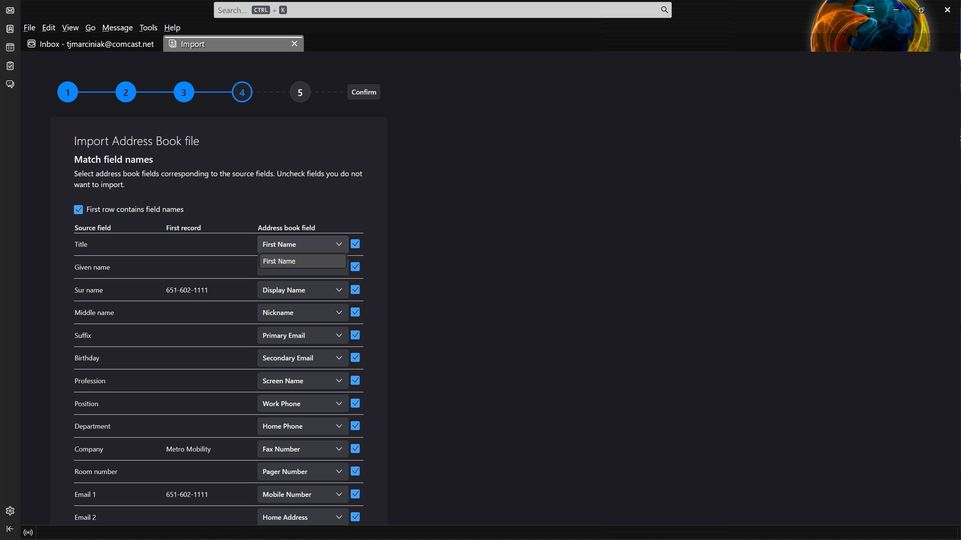
Hi, I'm a MTB newbie Version 115.11.1 and am just trying to import my comcast.net address book from CSV. MTB seems to be totally confused about the columns. I'd be happy to adjust the column assignments, as I think I'm supposed to, but it won't let me. The automatically selected column name is the only option allowed in the drop-down. See attached. Is this by design? Do I need to reorder the columns within the exported file. Seems a bit much really, but ultimately doable, I guess. Any other options? Or what am I doing wrong TIA Tim
Attached screenshots

All Replies (1)

The technique I have used is this: - export a csv from thunderbird, even if just one email address in the addressbook. Use this as a template - use a spreadsheet program to load the comcast csv and mirror the column settings of the thunderbird csv - the import should then go smoothly