I used to be able to preview personas when scrolling over them, I can't now, why?

When browsing personas on Personas for Firefox page, I used to get previews of them by scrolling over the images, now I need to wear each one to see if it will work/if I like it.
Has something changed or do I need to change my settings?
All Replies (3)
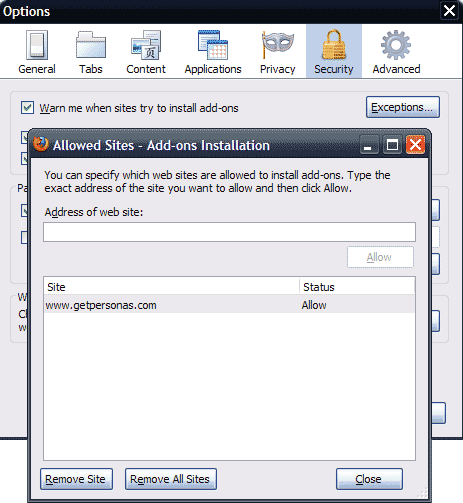
Found it, in security settings, needed to change the warning for websites trying to install add-ons. Had to make getpersonas.com an exception.
Happened to me also. Went to (tools, options, security) at the top uncheck warn me when sites try to install add-ons. Then went to (tools, page info, permissions) and uncheck use default then check allow.
This fixed it for me.
Benjamin solved this little nuisance but didn't quite spell it out clearly. Don't uncheck "warn me when sites try to install add-ons" instead add an exception by going to Tools>Options>Security then press the exceptions button and add www.getpersonas.com