


Suddenly, my html signature font is displaying wrong
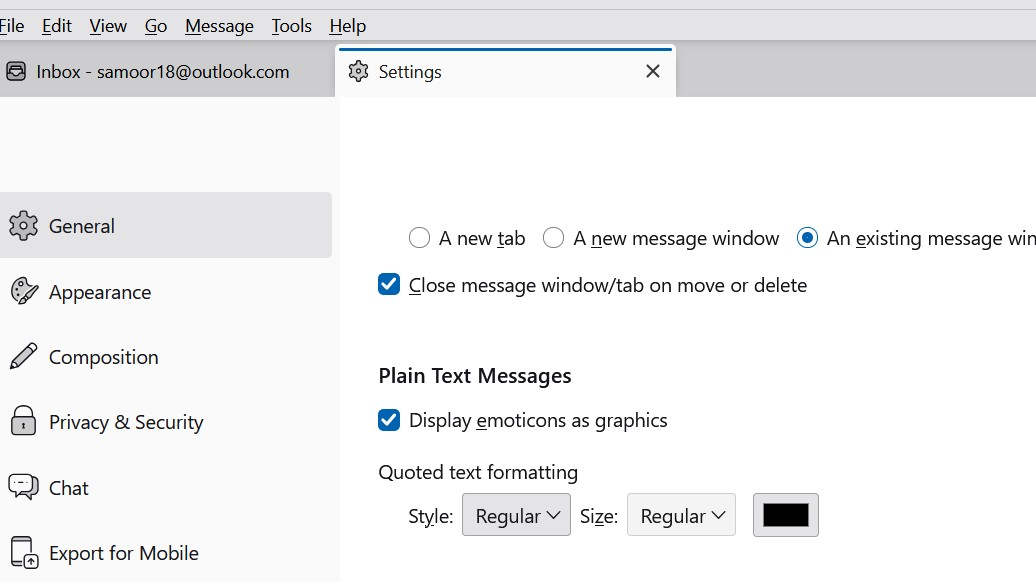
I use HTML as my signature. It has been working just find, but lately when people reply to me, their messages were coming in blue text. So today I changed the: Settings > General > Plain Text Messages > Quoted text formatting from blue colour to black (I have no idea how that was set to blue in the first place). that is all I did. Image attached of the change I made.
In any case, after that, when I tried to send a new email my HTML signature no longer displays the correct font (Pristina) but shows only variable text. The HTML file is not corrupt, it still looks fine in the actual file I saved, but, Thunderbird is changing it somehow. Even when I look back at sent files, Thunderbird is showing me the variable text and not Pristina.
Any assistance would be much appreciated. With thanks, NM
All Replies (32)
The 'support' you are getting is from me. And it's free. But, I will see if I can find a super guru who may have ideas. Any future suggestions from me will be a waste. I cannot duplicate your issue and there may be others who can help. but i do offer one item: send a personal note to yourself, not one with the business, just a personal note that includes the sig we worked on. do you have any addons? If so, try clicking help>troublehootingmode to ensure no addon interference.
Thanks again David, you are super!
Well, I sent request to one of the smartest people I know on the forum. I do hope he has time to review this. I am stumbling. :) But thank you for your kind words. And do send that private message with no addons. It may open a window. Regards,
I did try sending my signature to my NM email - with Thunderbird in troubleshooting mode with no addons. The sig is still not showing the Pristina font in my Thunderbird, but it shows Pristina in my Outlook account. So, unless someone can offer a method to fix it, I will have to assume it is working in my recipient's email client.
Again, David, thank you so much for your persistent attempts to solve my problem. (Two thumbs up).
NM.
That's puzzling but encouraging. Is that in the Outlook email client that you're speaking of? That is, the pristina font shows in one email client but not in Thunderbird? Does pristina show in compose window? But when you send to yourself it does not show? I'm lost on this . What version of thunderbird are you using? And, thanks for your kind words, but I am hoping that this will eventually be resolved.
Observations.
Thanks for uploading images and data.
1. You said: My html is what Thunderbird wrote as per their instructions, i.e. - open a new blank email, type in what is wanted, format it how I want, then save as a html file. That is what I did and that is the html that resulted from that. I never modified that html.
The actual signature was not created by typing all the signature using only Thunderbird. It has a load of copy pasted Microsoft code which only a Microsoft (Outlook) product can properly use. It seems you misunderstood something. Copy pasting code from a Microsoft product would not be something you would find as instructions when creating a signature in Thunderbird.
re :"'Open a blank email create or paste the wanted formatted text then click File > save as > choose HTML then save it to the folder"
I'm not seeing that...I read:
1. Compose and format your signature as desired. Note that numerous formatting functions are available from the Insert and Format menus. 2. Click File > Save As > File. Choose where to save your HTML file. Make sure Save as Type : "HTML files" is selected, and then specify a file name and click Save.
Pasting from anything created in Microsoft products is not advised because only Microsoft products can read all the code and reproduce it as desired.
2. When you create an email and that includes a signature, you are strongly advised to use fonts that are likely to be used on most computers and operating systems. Pristina is not a font generically used. So if your signature in emails is important to you then choose something more commonly used. For example: I'm using Windows 11 OS and Pristina is not a font on my computer nor available in Thunderbird.
re : but it shows Pristina in my Outlook account.
It will work in 'Outlook' as it is a Microsoft product. So it will understand all the microsoft html css in signature. According to Microsoft, the Pristina typeface is only available within Office applications.
3. Thunderbird does not use pt (points) that is only used by microsoft products. Thunderbird uses px (pixels). When I saw MsoNormal and pt, it was immediately obvious this signature was copy pasted from a Microsoft product. Your signature also uses font-family but if created in Thunderbird, you tend to see it uses Font face.
4. re:I will have to assume it is working in my recipient's email client.
I would not assume that at all. I'll guarantee, it would not work as you expect if you sent it to me or anyone not using Microsoft Office products. Even if it worked for you previously, that does not mean it ever worked for your recipients.
5. You posted info on settings in General, it may be helpful if you could upload some images of the following:
- Settings > General
- scroll to Language & Fonts section
- Click on 'Customize fonts' button
- Font for: select 'Latin'
Upload image of whatever it currently shows in that window.
- Then 'Fonts for' : select 'Other Writing Systems'
Upload image of whatever currently it shows in that window.
- Settings > Composition
- scroll down to 'Message Formatting'
Please post an image showing everything in the 'Message Formatting' and 'Sending Format' areas.
Please do the following:
In Account Settings completely clear anything you have in 'signature text' area
Also uncheck /do not select the option 'Attach the signature....
Basically leave it all blank.
Open a new Write Message window. It should be completely blank - no signature.
When creating signature: Advise on Font - you use a more generic font that is available on most Operating Systems and not only available in Microsoft products. Advise on Font Size - do not try to force a specific font size on anyone. Let the user choose whatever font size is suitable for their eyesight. But you can use the increase or decrease font options in the Formatting Bar if you feel they are appropriate to the design.
In the composing area:
- Press Enter twice. This is advised to ensure the signature is not forced too high and it gives you space to type normally when the signature is auto created..
- Select the Font
- Select the Italicize option
- Type the text : If you forward....etc
- Press Enter to clear some lines
Now to enter the webpage link
- Select the Font
- Select the Italicize option
- 'Insert' > 'Link' - small window opens
- Enter text : https://paintingartist.ca
- Enter the web page location: https://paintingartist.ca
- click on 'OK'
Does it all look ok to you? If yes:
- 'File > Save as > 'File'
- Choose where to save the file
Save html file in a suitable location. In 'Documents', I have a folder called 'TB Signatures' where I store all signatures I create for Thunderbird.
- Give file a suitable name eg: 'TB Formal Sig' or 'TB Website Sig'
- Save as file type: HTML
- Click on 'Save'
Now in 'Account Settings'
- In left pane - select name of account
- Select option 'attach the signature from a file instead...
- click on 'Choose'
- Locate the HTML file you just created and click on Open
Click on '+New Message' button
Please report on results.
Modified by Toad-Hall
Hello Toad-Hall, I have read your instructions, and that is exactly what I did over a year ago…> I opened a new blank email in Thunderbird, typed the text then formatted the text choosing the 'Pristina' font and the colours I wanted. Then I saved it as an 'html' file. I did not copy or paste anything. I typed and styled it directly in that blank Thunderbird email. Then I went into the appropriate Account settings and chose that html file. It worked!
I have been using that signature for all this time (over a year) with no problems, it looked as expected and worked as expected. Suddenly, a couple of days ago it changed - I no longer see the Pristina font when I am composing an email, I only see a default font. (see attached screenshot). Coincidentally, that change happened immediately after I fixed a problem with Thunderbird. (That problem was - when someone replied to a message their replies were all in blue, I didn't like the blue text so changed it).
Yesterday, I tried sending an email with my signature to myself in two of my other email accounts, one a gmail and one a yahoo. The signature looks fine when I open the sent email in those accounts, but it is still incorrect in my Thunderbird email client.
Additionally, if I open an email from my 'sent' folder in my Thunderbird, the signature does not show the Pristina font now even though it did before - now it only shows me the default font.
Thunderbird actually shows the Pristina font in the menu (see my attached screenshot), but does not display it to me anymore. Pristina is a script font, you can see for yourself that my signature screenshot is not showing a script font.
I will reiterate, I have been using that signature without any problems for over a year - I did not change it. It changed itself! and I will repeat, it stopped showing me the correct font after I stopped Thunderbird from changing all replies to blue.
David instructed me through a bunch of things - and it still will not show me the Pristina font. That is why I am still looking for assistance.
NM
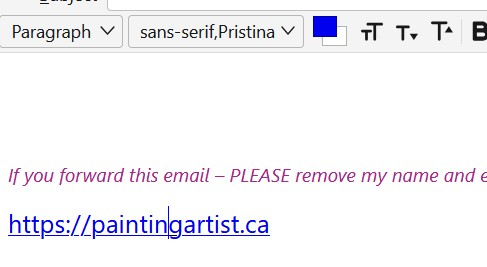
I think it will demonstrate the issue if I give you screenshots to view, here they are: First one is how it should look, and that is how it looks in gmail, outlook online email and yahoo email. The second one is how it looks in Thunderbird.
Thunderbird creates it properly and the recipients who have gmail outlook and yahoo will see it correctly, but I cannot see it anymore in Thunderbird even though it is sending it correctly.
So the problem is with how Thunderbird is rendering the Pristina font in my TB app on my computer. That problem occurred a few days ago for no apparent reason, except for what I already explained about fixing the blue reply text.
Can you help with my problem?


Just to jump in briefly, Toad-Hall mentioned that the pristina font is not aware on many/most computers. As such, it may behoove you to abandon the attempt to resolve pristina on your computer, as that could be a deep rabbit hole. Instead, I suggest using a font that is common. That may not be what you prefer, but it lets you move on to other issues as, even if you resurrect the pristina font, people will see something else.
NiagaraMouse said
Hello Toad-Hall, I have read your instructions, and that is exactly what I did over a year ago…> I opened a new blank email in Thunderbird, typed the text then formatted the text choosing the 'Pristina' font and the colours I wanted. Then I saved it as an 'html' file. I did not copy or paste anything. I typed and styled it directly in that blank Thunderbird email. Then I went into the appropriate Account settings and chose that html file. It worked!
Then please post an image showing the contents of that html file because so far all the images you have posted that show the html file contents were not created in Thunderbird unless you copy pasted everything from the outlook account.
Maybe you have posted an image of the wrong html file. The signature html file you are using in the Outlook email client cannot be used in a non Microsoft product.
Are you sure you have Thunderbird using the correct html file - the one you created in Thunderbird and not the file used in the Outlook product?
Modified by Toad-Hall
In an earlier comment I posted, it would be helpful if you could answer point number 5
I'm trying to establish whether there is a problem with unicode or Latin. I think it is designed for western encoding, but if Unicode is operating then it blocks Latin. So I need to see all the info I mentioned in point 5.
There is a reason why I'm asking you to provide accurate and specific information.
Modified by Toad-Hall
I'm not sure if you understood my point about using a font which can only be read by someone who has Microsoft Office installed. I repeat, just because you saw it in the past in Thunderbird, it does not mean all your recipients saw it. It is not a good idea to use a font that is not auto installed by the OS and that includes Windows, MAC and Linux. Pristina is not an auto installed font on any OS.
The fonts you select to use can be from other fonts named on your system, but to display correctly they must also be installed on the recipients system. That can be a phone as well as a computer. As you have no control of the readers environment you have to use caution when setting a font. Specifying a particular font sounds good, until you look at how that is rendered when the system does not have this. This is where the font family is used as a fallback if specified.
I'm still working on finding a reason why it no longer works. Changing the font colour of the plain text in a reply should not effect a font face or a link.
On the computer which has Thunderbird installed, do you also have MS Office installed and are you up to date with payments for that product licence?
Modified by Toad-Hall