


Thunderbird not showing old POP emails after moving mail storage - mailbox files still exist (Need Recovery Help)

Hello,
I need help recovering my old emails from Thunderbird.
I am using a POP account. Recently, I changed the message storage location from the C: drive to the F: drive. After doing this, Thunderbird only shows recent emails, while my old emails are missing.
Here is what I have checked:
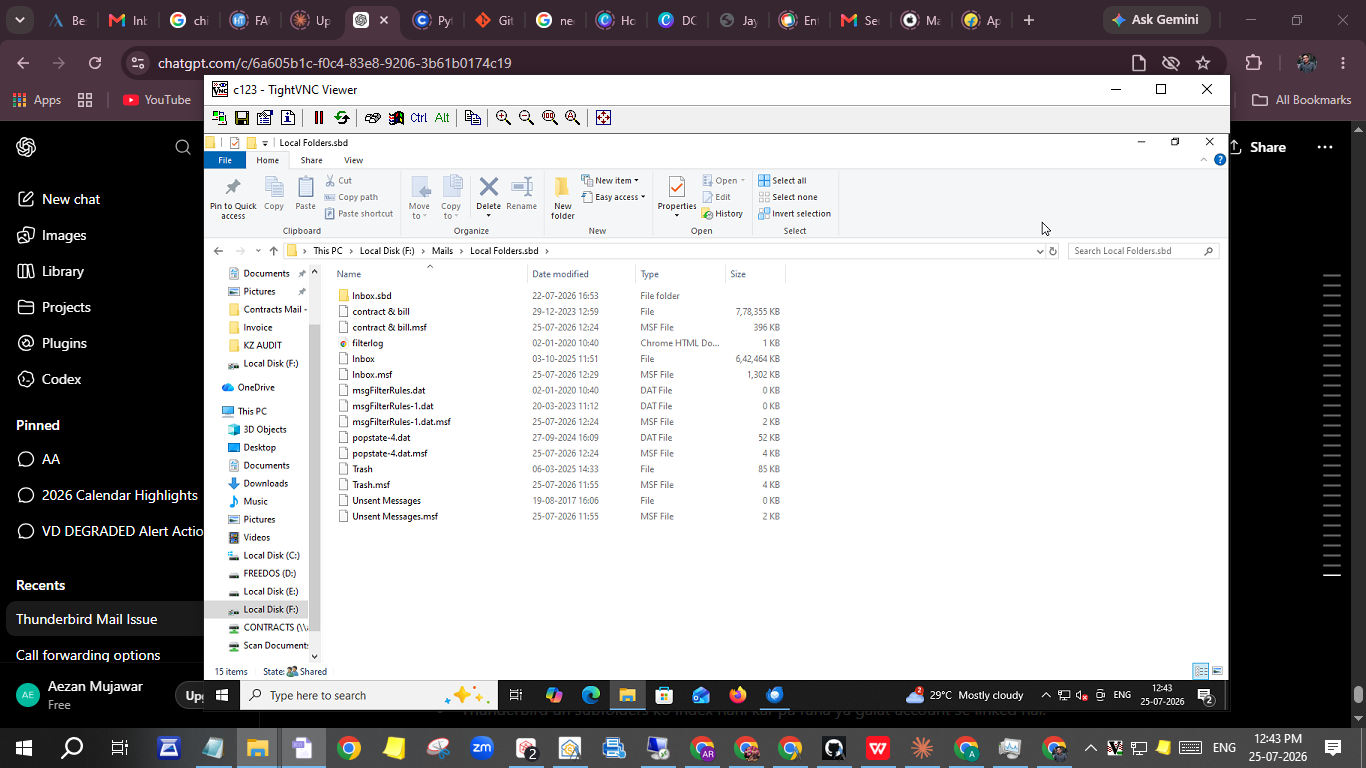
The mailbox files still exist on the F: drive. Inbox file: approximately 1.1 GB Sent file: approximately 1.18 GB I also have a complete Thunderbird profile backup of approximately 2.73 GB. The profile contains prefs.js, the Mail folder, and all profile files. Some account folders such as: pop.accessarchitects.in pop.accessarchitects-1.in pop.accessarchitects-2.in have Inbox files that are 0 KB. However, another mailbox file named Inbox is about 1.1 GB, which appears to contain my old messages. Thunderbird downloads and displays new emails correctly, but it does not display the old emails. I previously had around 60,000+ emails organised into many custom folders such as Contracts, Bills, Axis Bank Statements, Notifications, etc. Some mailbox files still have large sizes, but Thunderbird does not display their contents. My folder structure F:\Mails\
   Inbox (1.1 GB)
   Sent (1.18 GB)
   Inbox.sbd
   Local Folders.sbd
Inside Local Folders.sbd, I also have mailbox files such as:
Inbox (~642 MB) contract & bill (~778 MB)
The data appears to exist, but Thunderbird is not recognising or indexing it.
My Questions How can I reconnect these existing mailbox files without losing any data? Is there a way to rebuild the indexes so Thunderbird recognises the old messages? Could the issue be caused by an incorrect profile mapping after changing the storage location?
I have not deleted the original mailbox files, and I have a complete profile backup available.
Any help would be greatly appreciated.
Thank you.
All Replies (1)
Hello, one glance on your screen shot: it's a real mess you created by relocating message storage to another drive, and it would be very tricky to retrieve a working profile without many screen shots or having a look on your screen. If you have a backup copy of your complete "Thunderbird" folder containing your profile(s) I advise the following moves: The Thunderbird app closed, go to C:\Users\%username%\AppData\Roaming\Thunderbird\ and move the Thunderbird folder to your Desktop (or some other place). Then copy & paste the backup of your folder Thunderbird in C:\Users\%username%\AppData\Roaming\ here. On restart Thunderbird should display all your old POP accounts, folders and messages. It may happen that you will miss some recent messages already downloaded in the actual message storage local directory. But if necessary these messages could be recovered from the storage on F: drive.