


Mixup between content and subject in e-mail

In the last months I have received e-mails that says one thing on the subject line but the content of the e-mail is an old e-mail from before. I can see in the Inbox that the subject and corresponden is related, but when I open the e-mail the address to the sender is different than expected and the content is from another, old, e-mail. If I use the web-interface to the service provider and log on to their server, the e-mail looks OK and I can see the content that I expected to be there. The service provider can't see any issues on their side and I don't have enough knowledge about Thunderbird, or the mailing protocol, to provide additional informtion to them about possible issues. It feels like the issue is on the client side, but what do I know... This has happened 5-6 times in the last 4 months. The service provider, Telia in Sweden, changed their mail server about a year ago. I have used Thunderbird, and the same service provider, for 20+ years.
Chosen solution
Right-click the Inbox in the Folder Pane, Properties, Repair Folder, to rebuild the folder index.
Skaityti atsakymą kartu su kontekstu 👍 0All Replies (4)
Can you post a screenshot or two of this? I am having difficulty in visualizing the issue. Thank you.
Chosen Solution
Right-click the Inbox in the Folder Pane, Properties, Repair Folder, to rebuild the folder index.
sfhowes, thank you very much for you solution. It fixed the problem. Any suggestion regarding what has gone wrong and/or what I should or shouldn't do in the future to prevent the problem from reoccurring?
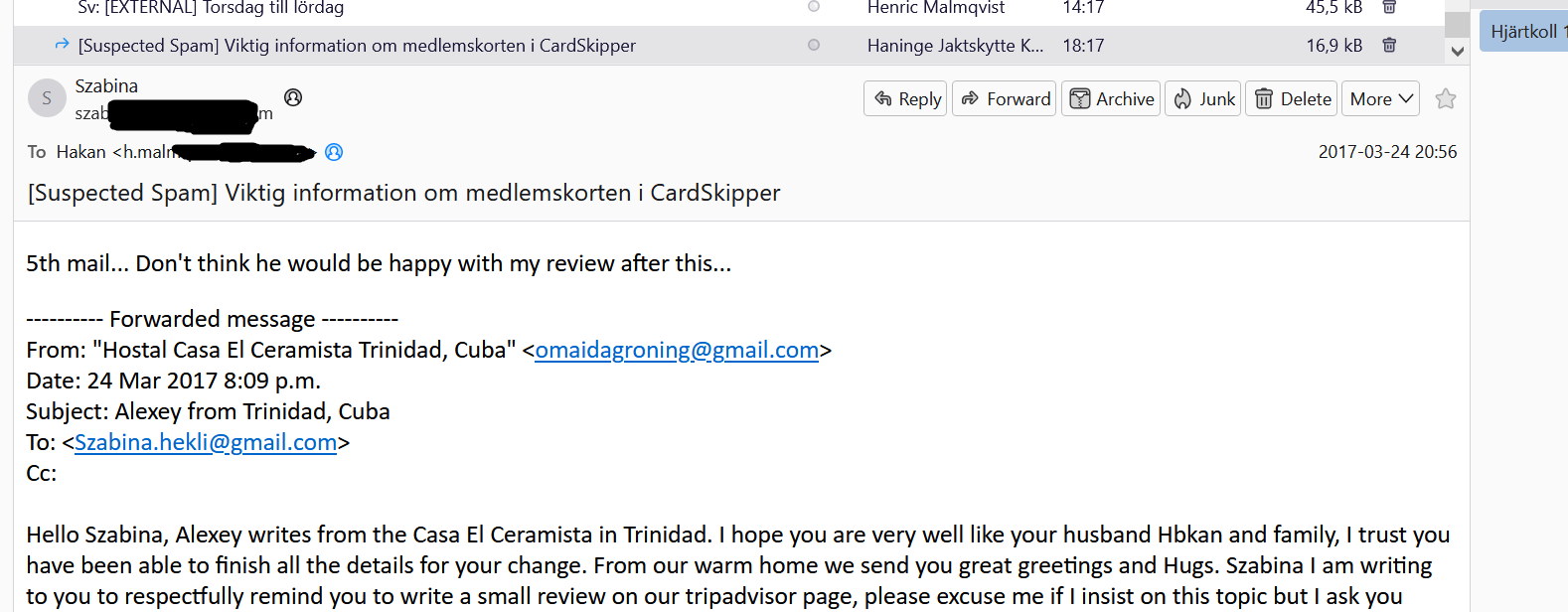
To david, I append a picture of one of the e-mails that I received in January. At the top you can see that the subject is something regarding information in the CardSkipper and it is from "Haninge Jaktskytte...", but the opened e-mail shows that it is from Szabina, with her e-mail address, dated 9 years back and something regarding a trip to Cuba. The new subject is still there though, in the old e-mail...
But it all looks good now thanks to sfhowes suggestion :-)
h.malmqvist said
sfhowes, thank you very much for you solution. It fixed the problem. Any suggestion regarding what has gone wrong and/or what I should or shouldn't do in the future to prevent the problem from reoccurring?
Not sure exactly what causes this, but it's worth applying standard Inbox measures to minimize chances this reoccurs:
- exclude the profile folder from antivirus scanning - keep as few messages as possible in the Inbox, and compact it regularly