Sort by sender

Previous versions of T-bird I could click on sender at top of message array and that array would be alphabetically sorted. Click on Date and sort would be by sent date. Now I can no longer do that. How can I accomplish this simple task in latest T-bird version?
Previous versions of T-bird I could click on sender at top of message array and that array would be alphabetically sorted. Click on Date and sort would be by sent date. Now I can no longer do that. How can I accomplish this simple task in latest T-bird version?
All Replies (2)

Hi Russ,
It works in 128. What version do you have?
Would you please post a sceenpic?
Rick
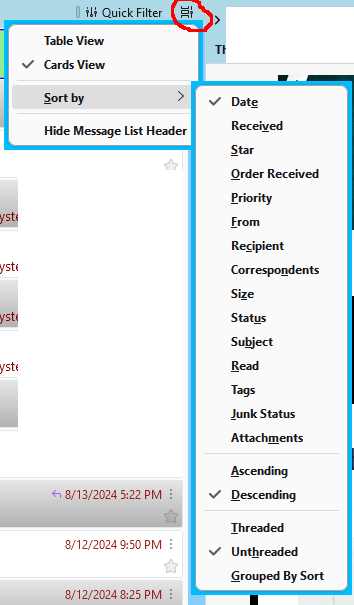
You probably have Cards View. Click the 3-bar menu icon, upper right, View/Layout, enable Message List Header, then click the circled icon in the attached picture to choose sort options. Table View is the classic display.