


I need "Never Ask Agian" to update password when i login in website by "Saved user-name and password"

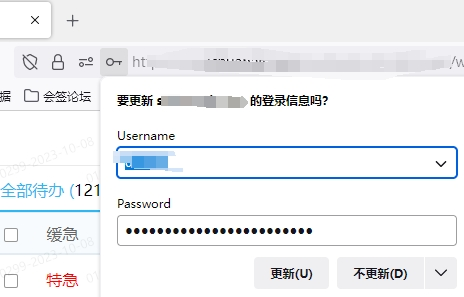
Every time i login in website by "Saved user-name and password",the Explorer will advise me to update saved password.Once i click "UPDATE",my saved password will be override by Random Strong Password and makes me can not login in next time. no matter how i click"update"or"not",the advise will show every time when i login in websites. ps: "Suggest and generate strong passwords" in setting is not chioced.
Every time i login in website by "Saved user-name and password",the Explorer will advise me to update saved password.Once i click "UPDATE",my saved password will be override by Random Strong Password and makes me can not login in next time. no matter how i click"update"or"not",the advise will show every time when i login in websites.
ps: "Suggest and generate strong passwords" in setting is not chioced.
All Replies (1)
You can create a login block exception for this origin (protocol and hostname) tto prevent Firefox from asking to update a saved login.