


Trash folder deletes my deleted emails

My trash folder deletes my emails after just 30 days. I want to keep my deleted emails in the trash folder for ever (or almost), but I can't a way to change the period for keeping the emails.
Ezalaki modifié na Bo
Solution eye eponami
Bo said
My Thunderbird account has got emails in Trash folder, the same as in the webmail Trash folder, but only emails younger than 30 days. I want to keep them much longer in Trash folder.
That proves the Trash folder in imap is fully synchronised with the server Trash, so that's good. If you want to keep emails then do not put then in the Trash. Trash is strictly for emails you do not want. It is not a place to archive emails.
If the server has a policy for deleting emails that have been in Trash for more than 30 days, there is nothing you can do about it. This could be something they have recently introduced. But it is something most servers are adopting because they need to maintain space on servers for wanted emails, so they clear what people do not want.
Thunderbird (no email client) has no control over the server regarding it's policies. So if you do not have any specific settings in Thunderbird to delete emails after 30 days then it's not Thunderbird, it's the server.
If you want to store emails for a longer period of time then clearly the emails are not unwanted so they should not be in Trash. Trash means rubbish that needs to go. The 30 days is a cooling off period just in case you deleted in error and need to keep, so you can get it out of TRash and put into a more suitable folder.
Some servers also have a recovery period of about 30 days, but anything you recover and want to keep must not be stored in Trash. I did locate this, so check it out: https://yousee.dk/hjaelp/artikler/gendan-slettede-mails-i-yousee-webmail
You would need to ask the Yousee mail.dk help service to see if they have a policy of removing emails from trash after 30 days.
The pop account on my smart phone can retain up to 10000 emails, and I can change the number that I want to keep.
Pop accounts can only access the server Inbox and download emails that are in the server Inbox. There is no synchonisation. Everything is stored on the computer or phone in the POP account. You cannot compare with an Imap account. Imap accounts store everything on the server and the imap account shows a mirror image of what is on server. Anything downloaded to an Imap account cannot be considered as a true independent copy because it can only display whatever is on server. The copy in imap can be used to create an independent backup.
Tanga eyano oyo ndenge esengeli 👍 1All Replies (16)
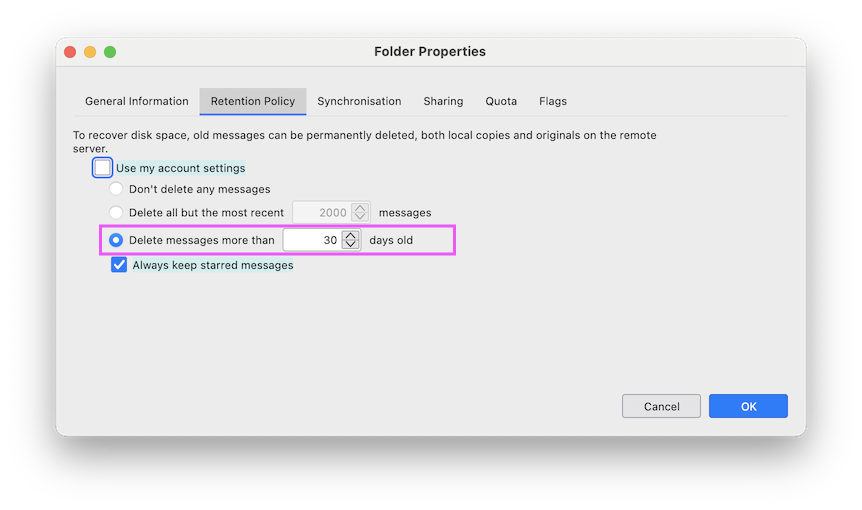
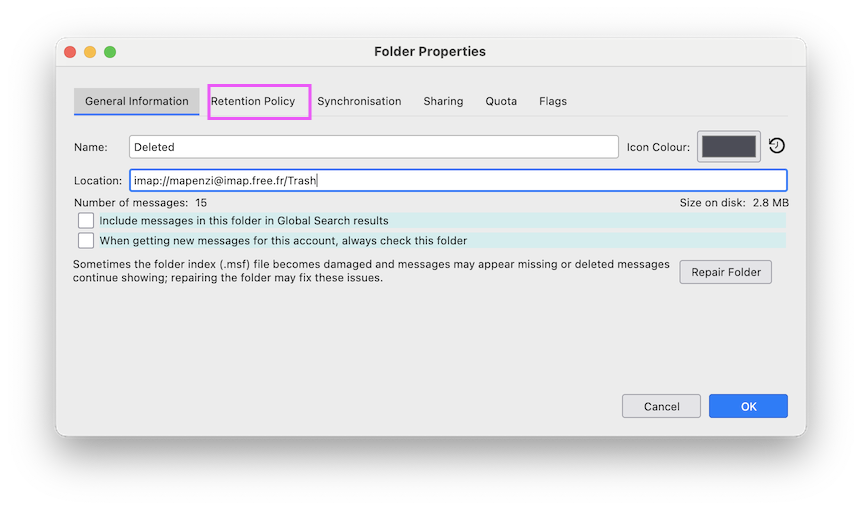
R-click on your Trash folder > Properties > Retention policy .... and verify whether the radio-button "Delete messages more then 30 days" is activated (see image). If it is the Trash folder in an IMAP account the 30 days delay might be fixed by your email provider. In this case log in to your webmail page and verify the retention policy.
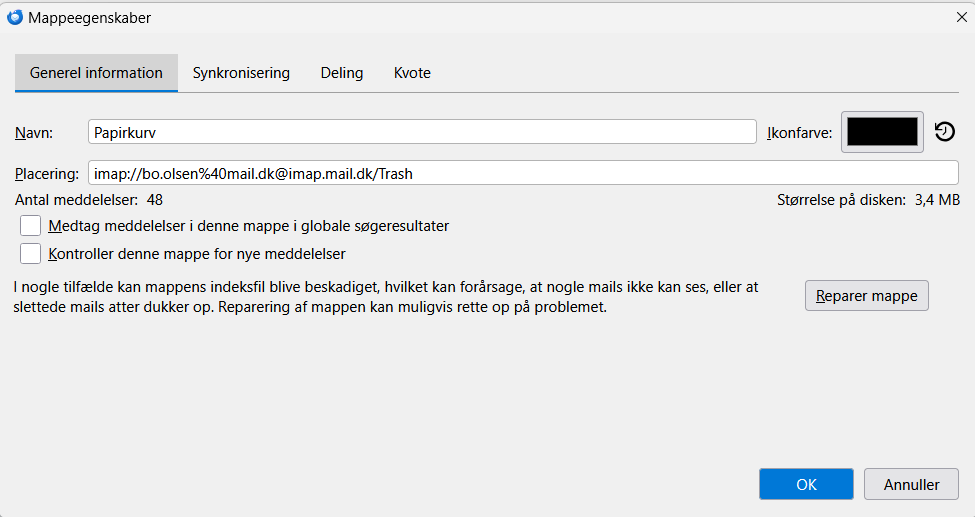
My trash folder's "Properties" is not like yours; in mine there is no "Retention Policies", only "General Information", "Synchronisation", "Sharing" and "Quota". So I can't choose "Retention Policies". My e-mail server is an "IMAP-mail server". But I can't find anything like Reention Policies there.
My screen shot has been made in the Trash folder properties window in an IMAP account (see my new screen shot)
Here is a screen shot of my Trash folder properties window in my IMAP account (note that it is in DANISH LANGUAGE!). I wonder why "Retention Policies" is missing.
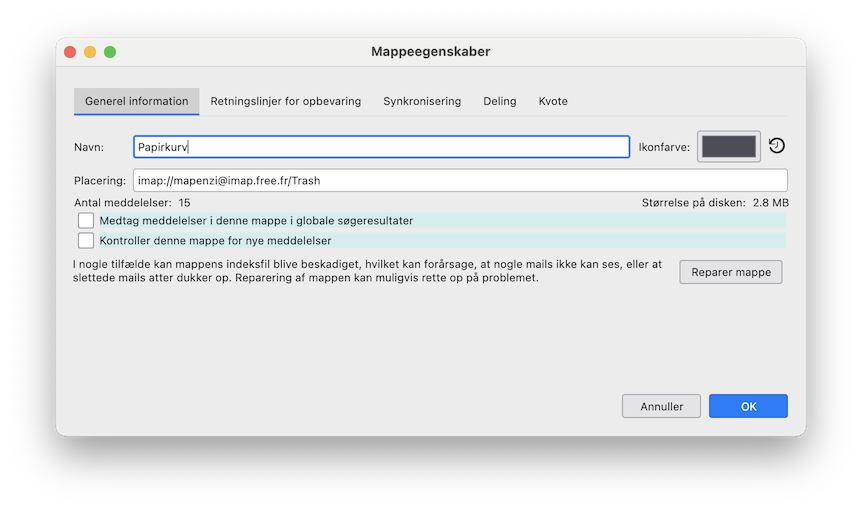
This is rather odd. Which OS and which Thunderbird version are you running? Is it a Thunderbird version you got from Microsoft? This is what I get for "Properties" of an IMAP Trash folder when I install the Dansk language pack (image)
I use Windows 11 and Thunderbird version 151.O (64 bit) which I downloaded from Mozilla Support (https://support.mozilla.org/da/kb/installer-thunderbird-i-windows). My trash folder didn't always delete emails after 30 days. Until a few months ago the folder kept all of my deleted emails.
Ezalaki modifié na Bo
In Thunderbird there are only a few ways to set up emptying of Trash.
- Right click on folder and select 'Properties'
- On 'Retention policy' tab
- select 'Use my account settings' - (where you can set up preferences)
- or override on this particular folder
- uncheck 'Use my account settings'
- select eg: 'Delete messages more than eg: 30 days old'
- click on 'OK'
I'm not sure why you do not see this option. It's not new - it's been around for decades. Maybe this is particular to the Danish version. I'll have to see if this has been reported as a bug.
In Thunderbird
- Account Settings > Server Settings
- under 'Message Storage
- Select checkbox 'Empty Deleted folder on Exit' - if desired, uncheck if not desired.
- Account Settings > Synchronisation & Storage for the account
- Select 'Don't delete any messages' - if desired.
- OR Select 'Delete messages more than eg:30 days - if desired.
However, I would like to draw your attention to the following: Many servers now auto remove/delete any emails that are selected as unwanted and put in Trash after a specific number of days. The number of days varies between servers. Gmail does it after 30 days - I believe yahoo empty every 10 days, spectrum auto empty every 3 days.
Yousee may also auto empty the trash. As you use Imap, the folders synchronise so an imap folder can only display whatever is on the server.
Thunderbird official website to get download/installation https://www.thunderbird.net/en-US/thunderbird/all/
For Danish you would need to select: Locale: Dansk
It might be worth uninstalling Thunderbird and getting a fresh download from the above link to see if the 'Retention Policy' tab then appears in the 'Properties' of selected folder.
Thank you for your suggestions, Toad-Hall,
I made a fresh download from the link you gave me, but there is still no 'Retention policy' tab in the 'Properties' of the trash folder. As you suggested, in "Server Settings" under "Message Storage" I have changed the selection "Don't delete any messages" to "Delete messages more than" and I have put in: "10000" days (!!), which I hope will work.
Ezalaki modifié na Bo
Bo said
My trash folder deletes my emails after just 30 days.
Did you install the same email address on a smartphone or an iPad? If this is the case the Trash messages might be deleted by the server of your smartphone mail client. I already have asked you to verify retention policy on your webmail.
Bo said
Thank you for your suggestions, Toad-Hall, I made a fresh download from the link you gave me, but there is still no 'Retention policy' tab in the 'Properties' of the trash folder.
Thanks for trying. I'll see if I can find out more on that.
As you suggested, in "Server Settings" under "Message Storage" I have changed the selection "Don't delete any messages" to "Delete messages more than" and I have put in: "10000" days (!!), which I hope will work.
The 'Don't delete any messages' would work, but you are talking about the Trash folder and an imap account, so that means emptying of the TRash can be done via anything that connects to server eg: another computer or phone OR and most likely by the server itself. That will override any setting in AccountSettings because it's done on the server external to your Thunderbird imap account. You would need to find out if you have a phone connecting to server that's set up to clear TRash. You also need to find out if the 'yousee' server auto deletes emails after a certain period. Is there a setting in the webmail account that controls when it empties the Trash and the Spam?
Please remember, you should not be storing wanted emails in the Trash, it's designed as a place to put mail that's no longer wanted.
I use the same email address on my smart phone, but with another email program, which is the email app pre-installed by Samsung. The email program on my smart phone does not delete emails from its trash folder: it retains emails there that are more than two years old.
I can't find any settings in my computer's webmail account (YouSee) that control when the trash folder deletes emails.
Ezalaki modifié na Bo
Bo said
I use the same email address on my smart phone, but with another email program, which is the email app pre-installed by Samsung. The email program on my smart phone does not delete emails from its trash folder: it retains emails there that are more than two years old.
If the imap account has no emails in TRash, then I assume there are no emails in the webmail Trash folder because they synchronise with each other. But if smart phone has emails in Trash over 2 years old then it's not an imap account. It's a pop account. Does the pop account have settings to download and pop off server or is POP set up to 'Leave messages on server'?
I can't find any settings in my computer's webmail account (YouSee) that control when the trash folder deletes emails.
There may not be any settings in webmail because if server auto empties Trash then it's a server policy and not something you have control over.
My Thunderbird account has got emails in Trash folder, the same as in the webmail Trash folder, but only emails younger than 30 days. I want to keep them much longer in Trash folder.
The pop account on my smart phone can retain up to 10000 emails, and I can change the number that I want to keep.
Ezalaki modifié na Bo
Solution eye oponami
Bo said
My Thunderbird account has got emails in Trash folder, the same as in the webmail Trash folder, but only emails younger than 30 days. I want to keep them much longer in Trash folder.
That proves the Trash folder in imap is fully synchronised with the server Trash, so that's good. If you want to keep emails then do not put then in the Trash. Trash is strictly for emails you do not want. It is not a place to archive emails.
If the server has a policy for deleting emails that have been in Trash for more than 30 days, there is nothing you can do about it. This could be something they have recently introduced. But it is something most servers are adopting because they need to maintain space on servers for wanted emails, so they clear what people do not want.
Thunderbird (no email client) has no control over the server regarding it's policies. So if you do not have any specific settings in Thunderbird to delete emails after 30 days then it's not Thunderbird, it's the server.
If you want to store emails for a longer period of time then clearly the emails are not unwanted so they should not be in Trash. Trash means rubbish that needs to go. The 30 days is a cooling off period just in case you deleted in error and need to keep, so you can get it out of TRash and put into a more suitable folder.
Some servers also have a recovery period of about 30 days, but anything you recover and want to keep must not be stored in Trash. I did locate this, so check it out: https://yousee.dk/hjaelp/artikler/gendan-slettede-mails-i-yousee-webmail
You would need to ask the Yousee mail.dk help service to see if they have a policy of removing emails from trash after 30 days.
The pop account on my smart phone can retain up to 10000 emails, and I can change the number that I want to keep.
Pop accounts can only access the server Inbox and download emails that are in the server Inbox. There is no synchonisation. Everything is stored on the computer or phone in the POP account. You cannot compare with an Imap account. Imap accounts store everything on the server and the imap account shows a mirror image of what is on server. Anything downloaded to an Imap account cannot be considered as a true independent copy because it can only display whatever is on server. The copy in imap can be used to create an independent backup.
Toad-Hall, thank you very much for your detailed information. It was helpful for my understanding.