


How to control how many connections Thunderbird for Android can do with the IMAP server?

Sometimes I got a problem with Gmail where I get the error "Too many simultaneous connections", both desktop and Android. I found that Gmail servers support 15 connections. I could reduce the number of connections for desktop in the config editor, but I would like how to do that in the Android app. Some times it creates a lot of connections, and I think the numbers stack up together with dead connection when I reboot my router and get a new IP, so I'm wondering how to set to get just one or two simultaneous connections on Android.
All Replies (4)

There's no setting within the app to limit the number of connections.
If your question relates to connections established to maintain a folders push notifications, you can find relevant settings under settings > account > fetching mail > advanced.
- Max folders to check with push
- Refresh idle connection
A server connection is maintained for each folder the push service is enabled on. Reducing the number of push enabled folders or limiting the max number allowed may help reduce the connections.
You do not need config editor in desktop to limit the number of connections. The default in advanced server settings is 5. Try reducing to two or three.
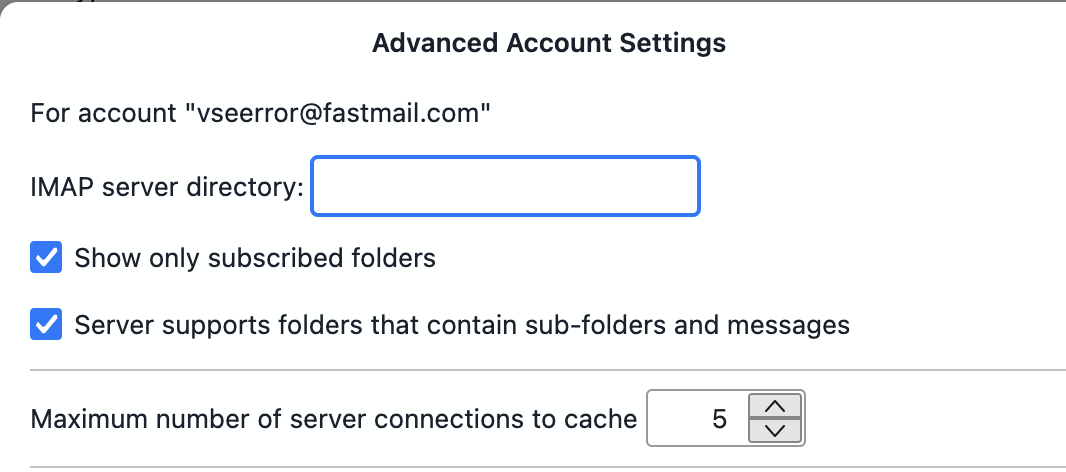
More details from developers...
Thunderbird for Android can keep IMAP connections alive after checking mail if possible. For Push mail, the number of long-lived IMAP IDLE connections is roughly the number of Push-enabled folders, capped by the account’s maxPushFolders setting.
The default values are:
Push folders: none by default Max Push folders: 10 IDLE refresh interval: 24 minutes So with default settings this should usually be fine. However, the Gmail limit can still be reached if the same Gmail account is used from multiple apps/devices, if multiple Gmail accounts are configured, or if Push/settings were changed to monitor many folders.
So an account used by one Thunderbird with default 5 connection (which is the maximum value) and one android device not set above the default should not have problems.
What I'm doing now is just keep my Inbox with push, since I really need to know when a new email arrives, and the other folders I'm using sync every 15 minutes. What would happen if I have, let's say, 15 folders with push enabled, and max push folders set to, let's say, 10? will it create 10 connections to sync the 15 folders?