


Windows 10 reached EOS (end of support) on October 14, 2025. If you are on Windows 10, see this article.

Search Support

Avoid support scams. We will never ask you to call or text a phone number or share personal information. Please report suspicious activity using the “Report Abuse” option.

Learn More

Thunderbird message header pane

  • 3 biyano
  • 1 eza na nkokoso oyo
  • 90 views
  • Eyano yasuka ya Rwing2
  • Eyanolami

Thunderbird message header pane is so large that I can't read messages. The top 2/3rd of my screen has the list of messages, header bar, files, etc. The bottom 1/3 is for the actual email message, but the header takes up nearly half of that with just the "From", "To", and "Subject lines taking up more than half of that space. Depending on the text of the html message, sometimes I can only read one line at a time, which makes it difficult to actually comprehend a message while scrolling, particularly if it's a long message. I can't resize it to make it larger, though I can make it smaller. My eyesight isn't quite as good as it used to be so I use a larger font than I used to, ie: 12pt rather than 10pt, and that makes it worse. Any suggestions?
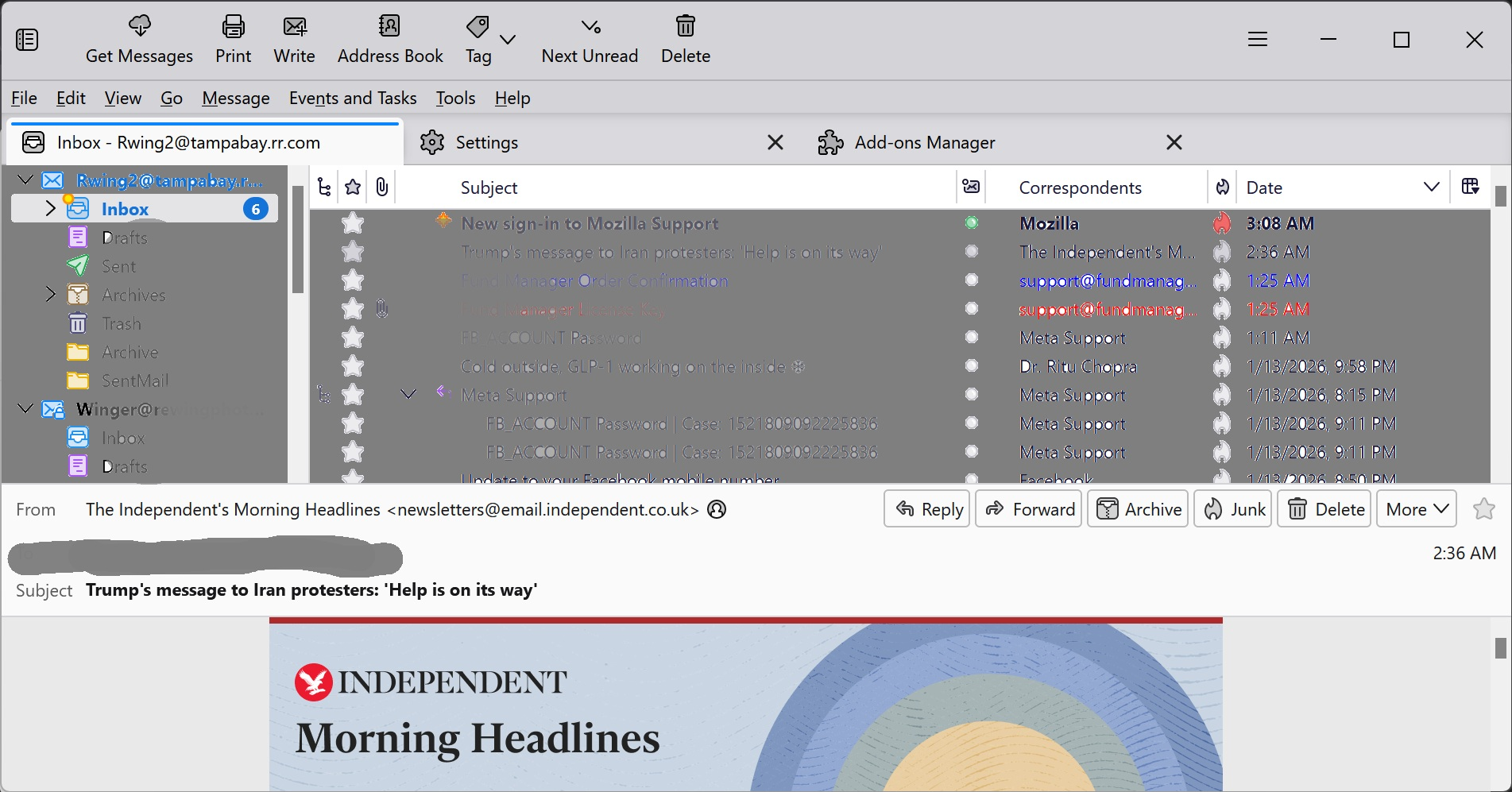
Thunderbird message header pane is so large that I can't read messages. The top 2/3rd of my screen has the list of messages, header bar, files, etc. The bottom 1/3 is for the actual email message, but the header takes up nearly half of that with just the "From", "To", and "Subject lines taking up more than half of that space. Depending on the text of the html message, sometimes I can only read one line at a time, which makes it difficult to actually comprehend a message while scrolling, particularly if it's a long message. I can't resize it to make it larger, though I can make it smaller. My eyesight isn't quite as good as it used to be so I use a larger font than I used to, ie: 12pt rather than 10pt, and that makes it worse. Any suggestions?
Bafoto sur écran jointes

Solution eye eponami

Install the very useful add-on "Compact Headers". https://services.addons.thunderbird.net/az/thunderbird/addon/compact-headers/ Instead of "Wide" view I'm using Classic" view (image)

Tanga eyano oyo ndenge esengeli 👍 1

All Replies (3)

Solution eye oponami

Install the very useful add-on "Compact Headers". https://services.addons.thunderbird.net/az/thunderbird/addon/compact-headers/ Instead of "Wide" view I'm using Classic" view (image)

View > Layout > Vertical view may work well for you too.

Thank you. The add-on did help. Now I can read it with the "wide" view, as well as the classic view.

Tuna motuna

You must log in to your account to reply to posts. Please start a new question, if you do not have an account yet.