

Mulongo oyo etiyamaki na archive.
Tuna motuna mosusu soki osengeli na lisalisi

Eza archivé
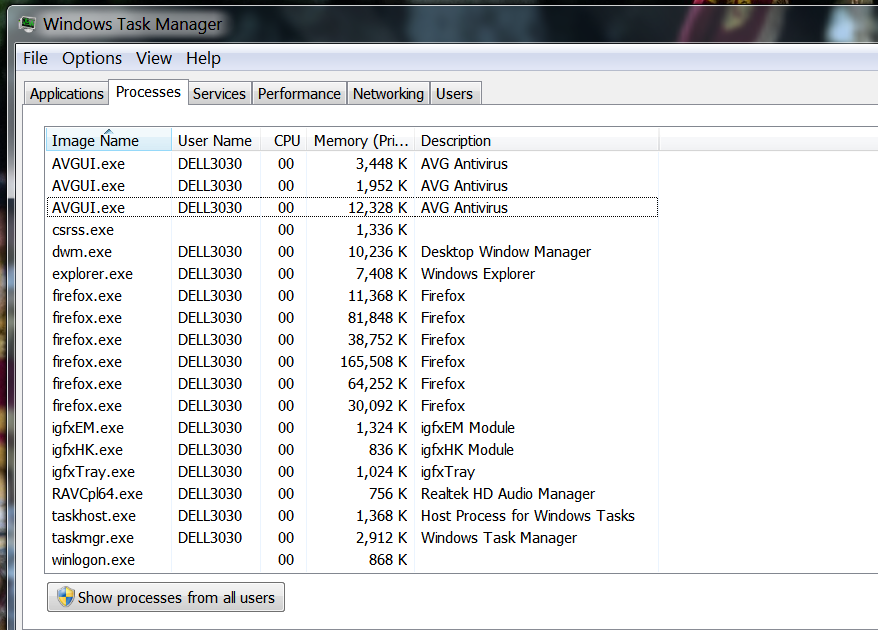
Multiple Firefox.exe running at same time
when I check Task Manager I see I have multiple firefox.exe running at the same time.. Why?
when I check Task Manager I see I have multiple firefox.exe running at the same time.. Why?
All Replies (1)
It is quite normal to see more Firefox processes running.
- one process for the main Firefox thread (user interface)
- one or more content processes, see:
Options/Preferences -> General -> Performance
remove checkmark: [ ] "Use recommended performance settings" - one process for the compositor thread
- one process for the WebRender when this feature is enabled
Current releases may use additional processes for features like extensions. See also the sidebar on the about:memory page.
You can find the current multi-process state on the Troubleshooting Information page (about:support).
- "Help -> Troubleshooting Information" -> "Application Basics":
Multiprocess Windows
Remote Processes
See also the Remote Processes section further down for more detail.