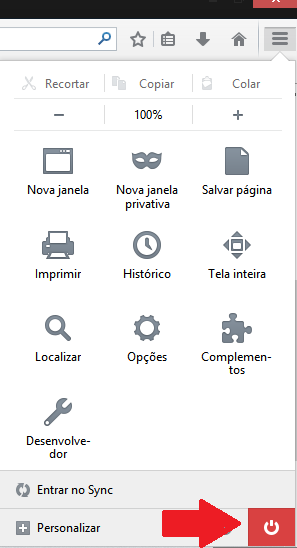
Where is the EXIT selection? I couldn't find it anywhere. I searched Firefox help and used Google. It might have been there, but I couldn't find it.

This is newly updated Firefox 29. Exit used to be some easy to find and remember place.
This is newly updated Firefox 29. Exit used to be some easy to find and remember place.
선택된 해결법
You can do that two ways
- Click the red X on the top right corner where the title bar is at
or
- Click The image "new fx menu" does not exist. and click the Power button near the bottom
모든 댓글 (2)

선택된 해결법
You can do that two ways
- Click the red X on the top right corner where the title bar is at
or
- Click The image "new fx menu" does not exist. and click the Power button near the bottom
Here a screen: