


I can't see youtube videos since last update

In the last 2 or 3 days, I have not been able to view YouTube videos. I can hear the audio portion, but the video area flashe up for a second then disappears. I have not changed anything on my computer, and this has happened since the last version update. YouTube works on IE. soIdo not believe it is my computer.
모든 댓글 (5)
You're not alone. If you want the threads to all the other pages, 4 of 'em I've found so far, just let me know. it ain't us. It's ONE of THEM....
Clear the cache and the cookies from sites that cause problems.
- "Clear the Cache": Tools > Options > Advanced > Network > Offline Storage (Cache): "Clear Now"
- "Remove the Cookies" from sites causing problems: Tools > Options > Privacy > Cookies: "Show Cookies"
Also, prevent You Tube from setting more cookies with: Tools>Options>Privacy>Exceptions and enter www.youtube.com.
Based on what I've read at the other threads, if you don't set this exception, you'll have to clear youtube cookies at least every time you use it. But cor-el's solution, plus this one, does work for some of us. I has for me, so far. Good luck!
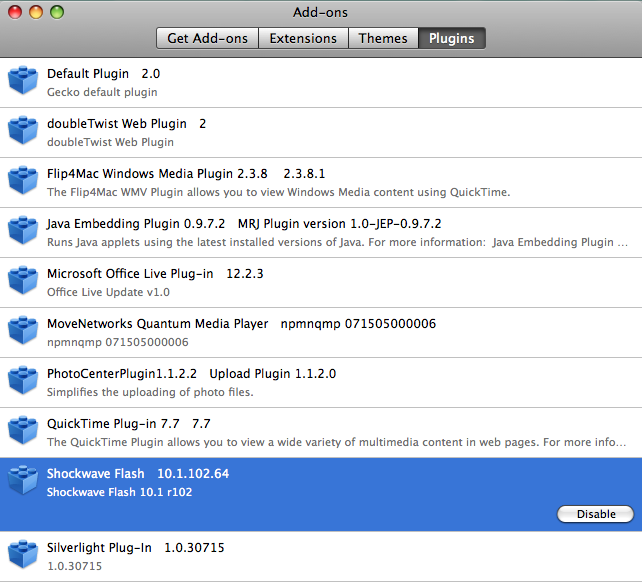
Anyone on a PowerPCMac with OSX 10.5.8, here's your fix: Go to Tools>Add-ons>Shockwave Flash. Disable this Add-on, wait then enable it. Should fix the problem.
Hi, when I follow the instructions for watching youtube on firefox, I get stuck at network tab it doesn't say offline storage or cache, there are options to configure how firefox connects to the internet. Cached web content and a tick box beside overide automatic cache management. There's a clear now button but this does not seem to do anything. Then below that it says offline web content and user data. There is a clear now button but this does not seem to do anything either. Smcgrogan