


Windows 10 reached EOS (end of support) on October 14, 2025. If you are on Windows 10, see this article.

Mozilla 도움말 검색

고객 지원 사기를 피하세요. 저희는 여러분께 절대로 전화를 걸거나 문자를 보내거나 개인 정보를 공유하도록 요청하지 않습니다. "악용 사례 신고"옵션을 사용하여 의심스러운 활동을 신고해 주세요.

자세히 살펴보기
열기

Tab title bar shows white text when white background is used.

mikeschwarz85018

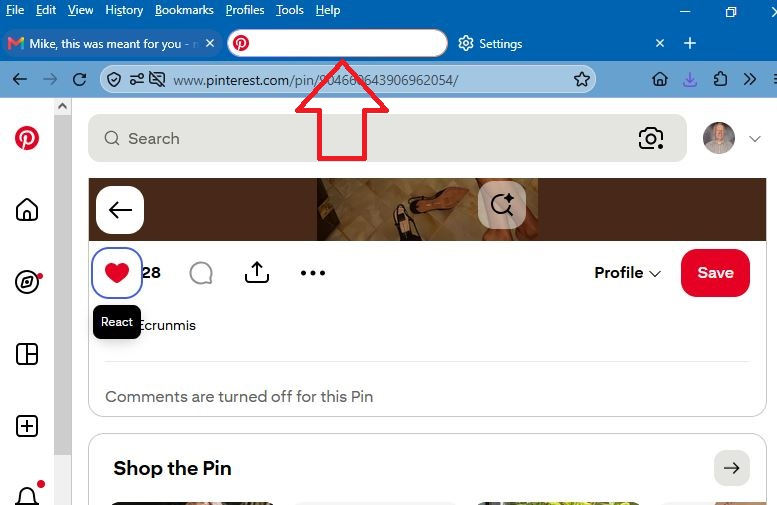
The topic that best describes my question is "Appearance", but I don't see that topic in the dropdown. Firefox 159.0.1. I have Firefox adhere to "system colors". The current tab title has a white background, the others blue. With an older version of Firefox, the text in the tab title was black if the background was white. With version 159.0.1, the current tab title uses white text if the background is white, making it unreadable. See images with red arrow pointing to what I'm talking about. The first 2 images show the new Firefox, 159.0.1. The 3rd image shows an older version, that properly adjusted the text color to black, if the tab title area was white.
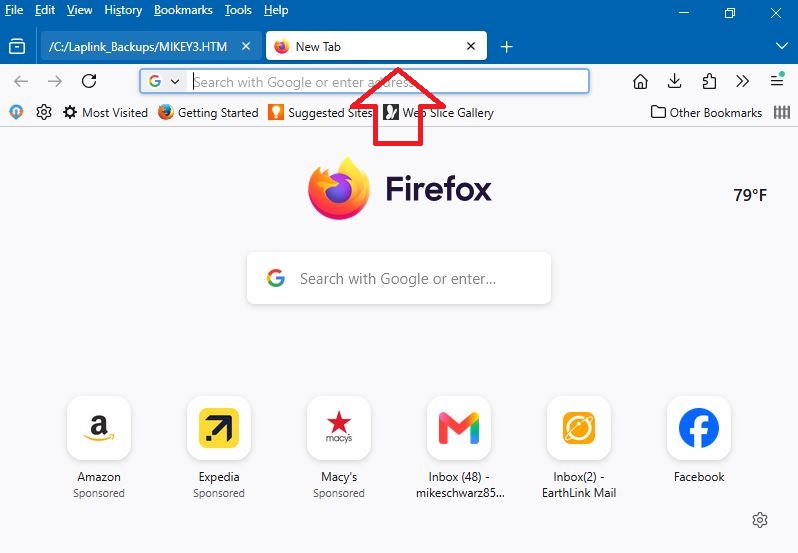
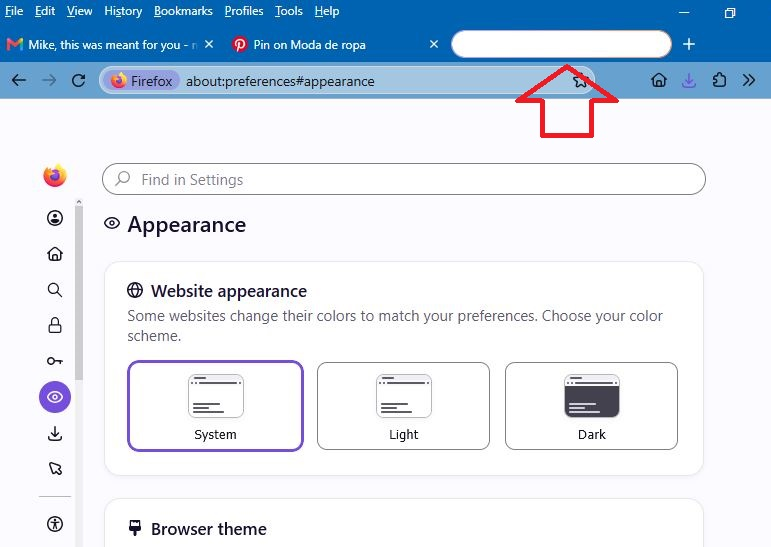
The topic that best describes my question is "Appearance", but I don't see that topic in the dropdown. Firefox 159.0.1. I have Firefox adhere to "system colors". The current tab title has a white background, the others blue. With an older version of Firefox, the text in the tab title was black if the background was white. With version 159.0.1, the current tab title uses white text if the background is white, making it unreadable. See images with red arrow pointing to what I'm talking about. The first 2 images show the new Firefox, 159.0.1. The 3rd image shows an older version, that properly adjusted the text color to black, if the tab title area was white.
첨부된 스크린샷

모든 댓글 (1)

Note: the order of the images were rearranged by the web site when submitted. The older version of Firefox is now shown in the FIRST image, the newer version is shown in the following 2 images.

질문하기

글에 답글을 달기 위해서는 계정으로 로그인해야만 합니다. 계정이 아직 없다면 새로운 질문을 올려주세요.