


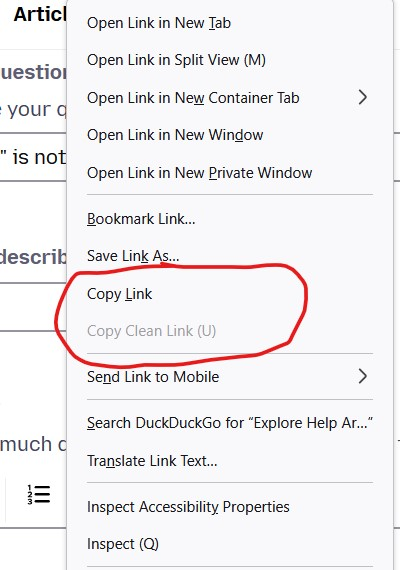
"Copy Clean Link" is not active

The Copy Clean Link option does not work- it is listed but "grayed out" & does nothing. I tried it in emails and on websites.
선택된 해결법
These belong to the actual sites, not known trackers — so if these get blindly removed, the link might stop working (like the /forward link — if you remove all the ? query params, there will be no content to link to etc.)
But try with universal attribution params like here on this site in the footer, e.g. the "Focus Browser" link — compare the normal and "Copy clean link" for it.
모든 댓글 (4)

I ran into this too, and it turned out the option is only active when the link actually has tracking bits to strip, like utm parameters — on a clean link it stays greyed out, which is normal. Try it on a link from a newsletter or a search result with utm_source in it, and you should see it light up and copy the link without those bits.
Thank you for responding - but the links I see, at least from my emails, have a lot of info attached.
I usually copy the link & delete everything after the "?" if I want to see the article or a recipe.
 Two examples:
https://us19.forward-to-friend.com/forward?u=7a94b00b29216564412018aa7&id=1a4b4a3f. . ..
and another:
선택된 해결법
These belong to the actual sites, not known trackers — so if these get blindly removed, the link might stop working (like the /forward link — if you remove all the ? query params, there will be no content to link to etc.)
But try with universal attribution params like here on this site in the footer, e.g. the "Focus Browser" link — compare the normal and "Copy clean link" for it.
Thank you - I think now I understand the difference. :-)