


Persistent Microsoft 365 / GoDaddy SMTP authentication failure in Thunderbird despite repeated troubleshooting

I need assistance with a persistent Microsoft 365 authentication problem in Thunderbird on Windows 11.
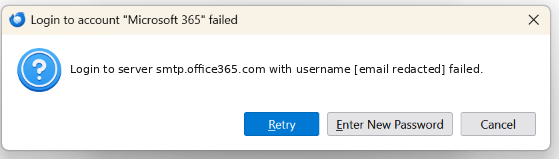
My business email is hosted through GoDaddy's Microsoft 365 service. Thunderbird repeatedly fails when attempting to send messages, displaying:
"Login to server smtp.office365.com with username [business email address] failed."
We have attempted to troubleshoot this problem on several occasions without achieving a reliable solution.
Previous troubleshooting has included checking SMTP settings, STARTTLS, OAuth2 authentication and investigating Microsoft Graph integration.
Our earlier investigation also indicated that SMTP AUTH may be disabled for the Microsoft 365 account.
The mailbox works through Microsoft Outlook, but having to remember to use Outlook separately creates a risk of missing time-sensitive business correspondence.
I would particularly appreciate assistance with the following:
1. Establishing a reliable, supported connection between Thunderbird and my GoDaddy-managed Microsoft 365 mailbox. 2. Determining whether Microsoft Graph integration can resolve this without enabling legacy SMTP authentication. 3. Identifying any known compatibility issues involving GoDaddy-managed Microsoft 365 accounts. 4. Providing specific diagnostic instructions so we can establish why authentication is failing rather than repeating unsuccessful configuration changes.
I can provide screenshots, Thunderbird version information and diagnostic logs with sensitive information removed.
I would be grateful for detailed technical guidance because repeated attempts to resolve this issue have been unsuccessful.
모든 댓글 (1)
Hello,
I am following up on my support request submitted on 2 November 2026, as I have not yet received a response.
Unfortunately, the problem remains unresolved. Thunderbird continues to fail when sending emails through my GoDaddy-managed Microsoft 365 account.
We have already spent considerable time troubleshooting SMTP settings, OAuth2 authentication and Microsoft Graph connectivity without finding a working solution.
As this is my primary business email account, I am particularly concerned about missing time-sensitive correspondence.
I would be grateful if someone familiar with Thunderbird's Microsoft 365 integration could review my original report and advise on the next steps, particularly whether the native Microsoft Exchange/Graph connection would be preferable to SMTP.
Thank you for your assistance.