


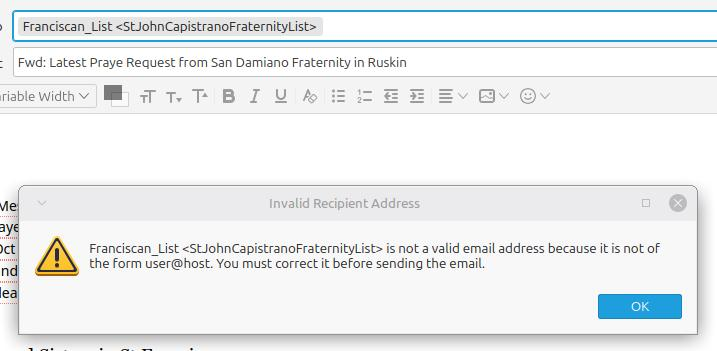
Getting error when sending to a mailing list that the emails are not in the User@Host format, but expanding list works ?

Good Day,
When sending email to a list in my address book, I get the error stating that its not a valid email address and to verify it is in the User@Host format. However, if I right click on the list name and choose EXPAND LIST and it then correctly displays all the email addresses and names, and it sends completely fine and without issue ?
Any ideas have to fix that issue ? Thank you in advance for your assistance.
선택된 해결법
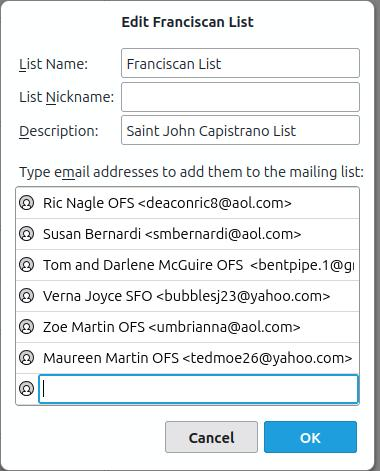
Thanks for the feedback. Possible that it did not like long continuous Description or needed spaces. Glad to hear all is working.
모든 댓글 (4)
In the past this issue has occurred, so I'm not sure if this an old previously fixed bug that has shown itself again.
Sometimes it occurred because the List Name used a underscore/hyphen. Suggest you first try renaming that Mailing List from' 'Franciscan_List' to 'Franciscan List'
create a new email using the updated Mailing List name.
At one time, the issue occurred because it did not like a blank space and the insertion of the underscore solved the problem. But as you already had an underscore, I suggested a removal to see if all was ok.
IF removing underscore from Mailing List name did not solve anything. In the Mailing List, I know you have set up a 'Description', but have you also entered text in the 'nickname' field ? If yes, what ? It would be helpful if you could upload an image showing the top part of that Mailing List. Where it says 'Name, Nickname, Description'. So we now what is set up and we know it's not working with that information.
Then remove the nickname if it has one. Create a new message and try again. You cannot use any previously opened new message window. Report back on results.
I'm asking you to try specific steps because 1. Trying to fix issue using old previously known techniques. 2. I'm collecting information if a bug needs reporting and precisely what is causing it. Thanks for your co-operation.
Good afternoon, And thank you for taking your time assist in this headache.
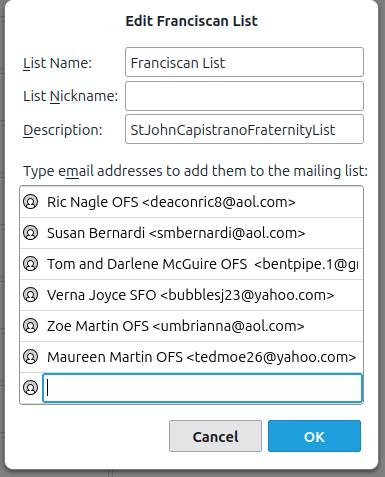
Per your instructions I am attaching a screenshot of the list editor with the Name, nickname etc. I have tested the following : 1) I removed the Underscore from the email list name. ( replaced with a space)
I subsequently tested sending a new email to the list and got same error.
2) I had nothing in the nickname ( including no whitespaces) , I subsequently entered "Community List" in the nickname and tested sending from a new email and that failed.
3) I resolved the issue by removing the description entirely. Sent a new message and that sent without issue.
4) I then added text of some versions to the Description line and it also sent without issue. I am attaching also the current version that works.
I hope this helps someone else in the process !
선택된 해결법
Thanks for the feedback. Possible that it did not like long continuous Description or needed spaces. Glad to hear all is working.