


URGENT: New Email is received, Can be found using quick search, but not appearing in INBOX or SPAM folders

I have Proton Mail, and Proton Bridge. It was working until Yesterday. Starting Yesterday, New emails would show up in the Web app, and the ProtonMail Desktop App, but would not make it to the Thunderbird Inbox. The first email that did this arrived at 1:30PM on 10/19. When a new email arrives, a new email windows notification will popup in the lower right hand corner. I checked Spam, and it is empty (I find this hard to believe). My phone also displays a new mail notification.
I know Thunderbird is receiving the emails. I can find the new emails by using "Quick Search", and searching for the email address of the sender of the new email. The results are completely without formatting, and do not indicate what folder they are in.
For example: I have a Gmail Account (redacted@Gmail.com), and I sent a test message to my ProtonMail address (redacted@Proton.me). That email contained the subject line "Ping 10/20" and it contained my auto signature. If enter "redacted@gmail.com" into the quick search, and I hit the return button, it only finds a message I sent about 7 weeks ago.
If I then click on the magnifying glass icon, a new tab opens up with the results. It displays the first 10 results of 54 results searching for "redacted@gmail.com". At the top of the results is my "Ping 10/20" test email. I could not find the folder name where my "Ping 10/20" test email is located on this results tab.
I see that the text "Ping 10/20" is a hyperlink, so I click it. The tab shows up, and strangely, it show the email and one reply. No reply was received by the Gmail account.
I have done troubleshooting of the ProtonMail bridge. The fact that the email is found somewhere in my thunderbird installation, I don't think ProtonMail Bridge is the issue.
글쓴이 Wayne Mery 수정일시
선택된 해결법
Thanks for all the detail.
> TB displayed the "New Mail" windows notification in the lower right corner
I believe that is the Windows Notification Area (also known as system tray) showing notifications sent to Windows by Thunderbird, and is a clear indication that in fact the message were received.
> but it did not arrive in my inbox
Did the message count for the Inbox increase? If it did increase, then what you mean is the new messages did not appear in the message list.
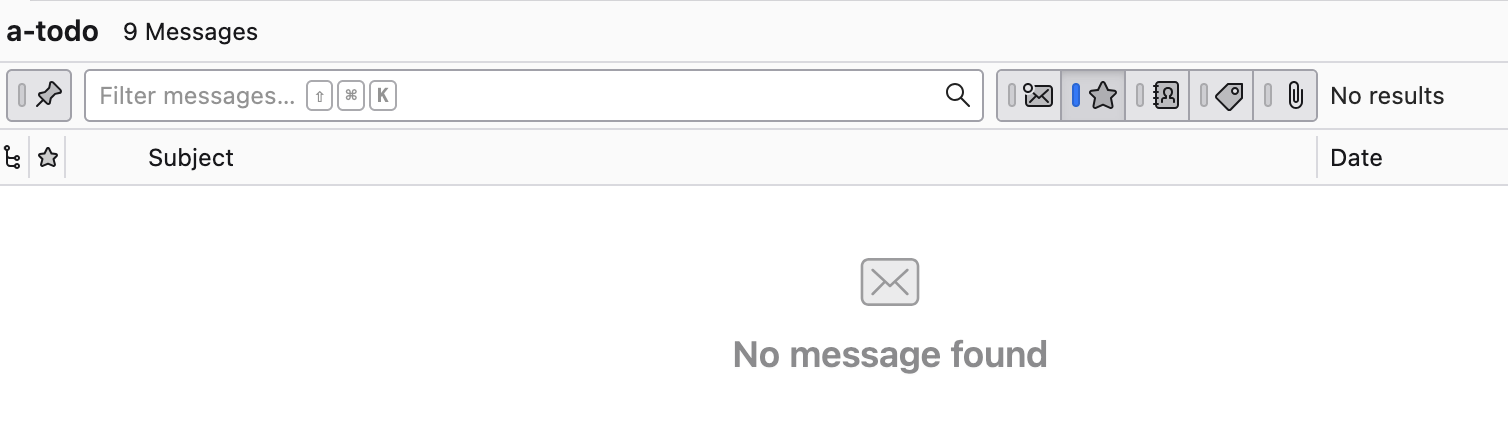
Here is what the quick filter looks like when the second button (of 5 buttons) is selected to only show starred messages, and there are no starred messages in the folder
모든 댓글 (6)
>>>> ATTENTION MODERATOR <<<<<
CAN I PLEASE GET THIS QUESTION DELETED? WITHOUT THINKING, I PUT MY EMAIL ADDRESSES IN THE POST, AND I AM UNABLE TO EDIT THE POST!!!!!
Oh and I figured out a workaround to the bug in Thunderbird. However, my exposing my personal information is more important that the work-around I found.
I have removed your PII.
Can you post your workaround?
I have a work-around to my problem.
The problem has to do with the "Quick Filter" feature of the Inbox. Before emails stopped appearing in my Inbox, I was using the "Quick Filter" feature repeatedly to search for emails. Between each search, I would simply click the 'X' in the Quick Filter box to remove the current filter. After my last search, I clicked on the 'X" to clear the box, but I saw no reason to press the "Quick Filter" button to close the feature.
What I have discovered is that leaving the "Quick Filter" open, even if it is cleared of text, will block new emails from showing up in the Inbox. My work-Around is to make sure that when I am done using the "Quick Filter" feature, is to be sure to press the "Quick Filter" button to close the box.
I cannot think of any valid reason to block new email from being displayed just because an empty "Quick Filter" box is open. When you clear that box, all of your current emails come back into view. It is reasonable to assume that new emails are will still be displayed. IMHO, this is a bug, with a workaround: always press the "Quick Filter" button to close the field when you are done with searching.
A possible fix to the bug is to monitor receiving new emails if the "Quick Filter" box is open, and to display "New Email Received" somewhere on the inbox when a new email is received, but the new email is not displayed in the inbox. If the display is a modal Dialog box, I suggest the text:
"A new email has been received, but is not displayed because the Quick Filter is open. Press the "Quick Filter" button to close the quick filter, and display the new message."
Be sure to offer a "Do not show me this again" option.
I use quick filter a lot and have not experienced the issue you describe.
You are seeing this either because
- one or more of the filter buttons to the right of the text area is active
- some add-on is installed and interfering
- a bug which has not yet been reported
I believe I updated ThunderBird about a week ago. I just checked my version, and it says I should restart Thunderbird to get 158. I never reboot my computer, unless Windows Update needs it.
I was careful in my testing. I sent an email from my Gmail Account (which is not configured in TB), to my Proton Mail Account (Configured in TB via Proton Mail Bridge). TB displayed the "New Mail" windows notification in the lower right corner, but it did not arrive in my inbox. I checked the ProtonMail Desktop app, the test email was there. The web browser version also showed the test email.
As soon as I pressed the "Quick Filter" button to close the "Quick Filter", a dozen emails from the previous 24 hours showed up. This was 100% reproducible yesterday. I do not see any buttons to the right of the text area.
I just tried it again, and my new test email message came through. Go Figure. I will still close the quick filter when I am done, as I missed a number of important emails.
Something that might be related. Just prior to my issue, I was trying to use the "Create Filter From Message" feature. I was hoping to get the function in Gmail that with a single click of "Filter Messages Like These" button does exactly what the button says.
The TB "Create Filter From Message" feature brings up a detailed dialog, that requires a decision on what to do with the results of the filter. This is before I have a chance to decide if I want to keep some of the emails, or delete them all. I also have to create a name for a filter that I will never use again.. Too much work.
The workflow in Gmail is as follows: 1) I notice that I am on an email list I don't remember subscribing to, and I just got another email 2) I click on the "Filter Messages Like These" button. 3) All emails from only that sender are displayed. 4) I quickly scroll down through the emails, to figure out if I just want to get rid of all of them. 5) I hit "Unsubscribe" in the original email 6) I hit the delete button, and all of the matching emails go away 7) I do not have yet another named filter that I never expect to use again.
선택된 해결법
Thanks for all the detail.
> TB displayed the "New Mail" windows notification in the lower right corner
I believe that is the Windows Notification Area (also known as system tray) showing notifications sent to Windows by Thunderbird, and is a clear indication that in fact the message were received.
> but it did not arrive in my inbox
Did the message count for the Inbox increase? If it did increase, then what you mean is the new messages did not appear in the message list.
Here is what the quick filter looks like when the second button (of 5 buttons) is selected to only show starred messages, and there are no starred messages in the folder