


FF tabs disappeared and disappear every time I restart FF, despite settings to stay open.

Two days ago I closed FF and went to bed. I opened it the next morning and lost about 20 tabs. Ever since then, every time I restart FF, I lose all tabs except for one default tab.
TLDR: 1. "restore previous session" is not available. 2. Toggling Settings/Home and Startup does nothing. 3. Update? My FF automatically updates. 4. "about:sessionrestore" finds nothing,
1. FF help said I could go into History and click "Restore Previous Session" but that option doesn't exist. All I can do is look at History and see lists for today, yesterday, last 7 days etc.
2. Another advisory suggested Settings, Home and Startup, select "Open previous windows and tabs". but it was already selected. So I switched it off, restarted FF and then switched it back on. I still lose all tabs every time I restart FF.
3. Another advisory suggested, checking for updates. My FF automatically updates.
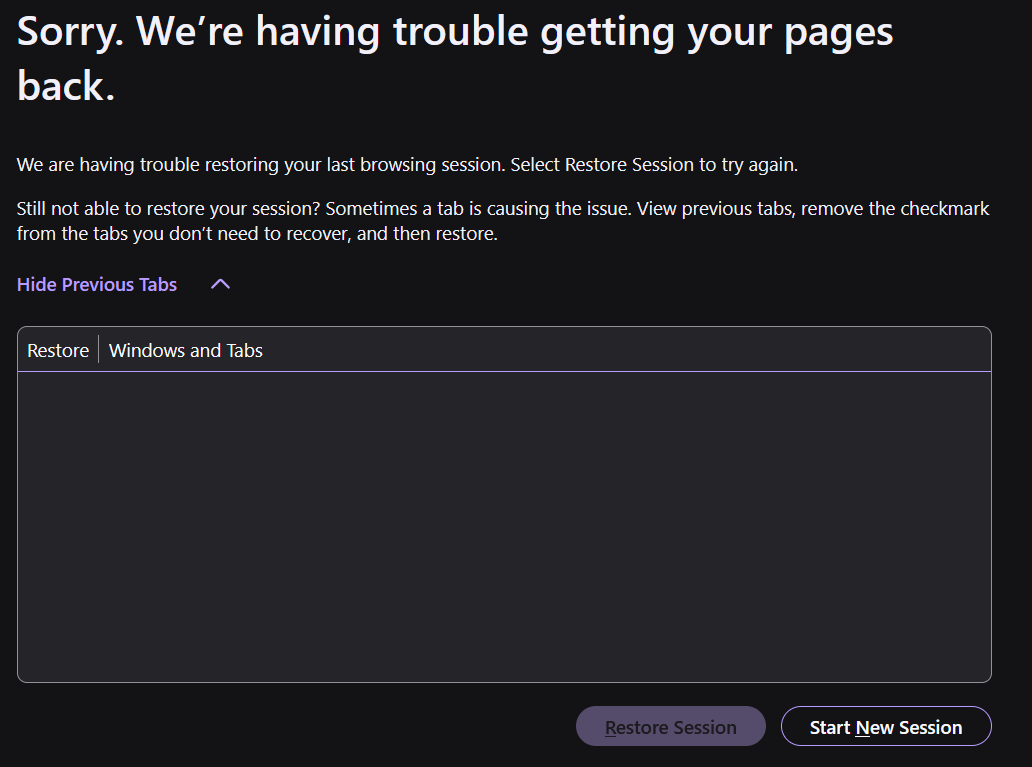
4. I tried "about:sessionrestore" It returns with the heading: "Sorry. We’re having trouble getting your pages back." Restore session is greyed out and "View previous tabs" produces an empty list. I've tried it a few times now, identical result.
Thanks for any help. Cheers, Andrew
모든 댓글 (3)
Hi,
A couple of questions:
- Does the issue persist after a device restart?
- Do you have several Firefox windows open?
- After you close Firefox, are there any Firefox processes left in the Windows Task Manager?
선택된 해결법
Thanks Denys,
To your questions in order...
1. After your question, I closed all open windows then restarted Windows. When I restarted Firefox, the 6 tabs I had open were all there. smh. I should have remembered the old "restart Windows" rule. I usually restart Windows about once a week, but I had not at the time this issue happened.
2. I sometimes have "Private Browsing" open, but I didn't when this issue first happened. And I never have separate panes open. They're always in tabs.
3. I should have checked processes before restarting Windows. But having checked after the restart, running Firefox and closing it again - there are no processes left. I have seen Firefox processes lagging previously, but not recently.
Thanks again
Considering your issue is resolved, I'll mark your reply above as a solution.
To elaborate on windows/processes advice: The proper way to close Firefox is via the Firefox menu > Exit (or Ctrl+Shift+Q). If you close a Firefox window, the browser treats this just as a window closure, unless it's the last open window. Closed windows are not restored, so if you have several Firefox windows open, you should exit Firefox as described previously instead of closing them one by one. (This applies only to regular, non-private windows.) If for some reason a Firefox process is left with no window visible, it may still be treated as an open window (causing tab loss). However, even when the above is the case, you should be able to restore your tabs via History > Recently closed windows.