


고객 지원 사기를 피하세요. 저희는 여러분께 절대로 전화를 걸거나 문자를 보내거나 개인 정보를 공유하도록 요청하지 않습니다. "악용 사례 신고"옵션을 사용하여 의심스러운 활동을 신고해 주세요.

자세히 살펴보기
Open

Startup pages aren't remembered.

douglasbarr2000

Your most recent update ruined what I have relied on for years in Firefox.

I have about nine sites that have ALWAYS started up on opening Firefox. 3 newspapers, 2 games pages, 2 sport pages, and a couple of generic pages for searching.

The recent update in Settings doesn't keep those nine sites, or offer a way to keep those automatically., It only offers 'Keep the existing sites' that are currently there. Or something similar to that description.

I like to start with my nine starters. Occasionally I'll change one out (e.g. Wimbledon instead of French Open), but through a day, I'll be adding more pages and deleting pages, yet still, I want tomorrow to start with my nine pages.

Why was this option removed, or am I just not seeing it? I don't want to have to create a Custom Home Page in settings every time.

What is your solution?!? Doug
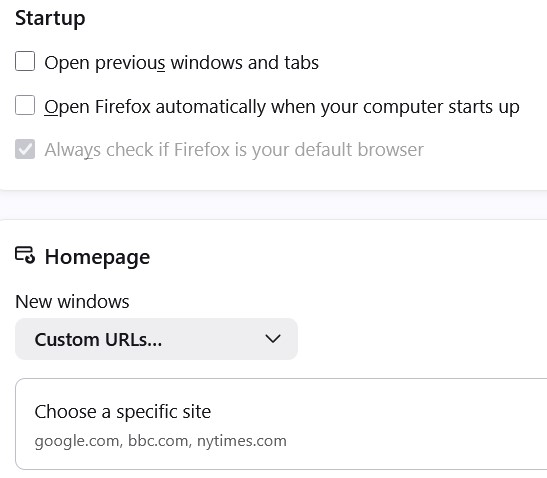
Your most recent update ruined what I have relied on for years in Firefox. I have about nine sites that have ALWAYS started up on opening Firefox. 3 newspapers, 2 games pages, 2 sport pages, and a couple of generic pages for searching. The recent update in Settings doesn't keep those nine sites, or offer a way to keep those automatically., It only offers 'Keep the existing sites' that are currently there. Or something similar to that description. I like to start with my nine starters. Occasionally I'll change one out (e.g. Wimbledon instead of French Open), but through a day, I'll be adding more pages and deleting pages, yet still, I want tomorrow to start with my nine pages. Why was this option removed, or am I just not seeing it? I don't want to have to create a Custom Home Page in settings every time. What is your solution?!? Doug
첨부된 스크린샷

글에 답글을 달기 위해서는 계정으로 로그인해야만 합니다. 계정이 아직 없다면 새로운 질문을 올려주세요.