


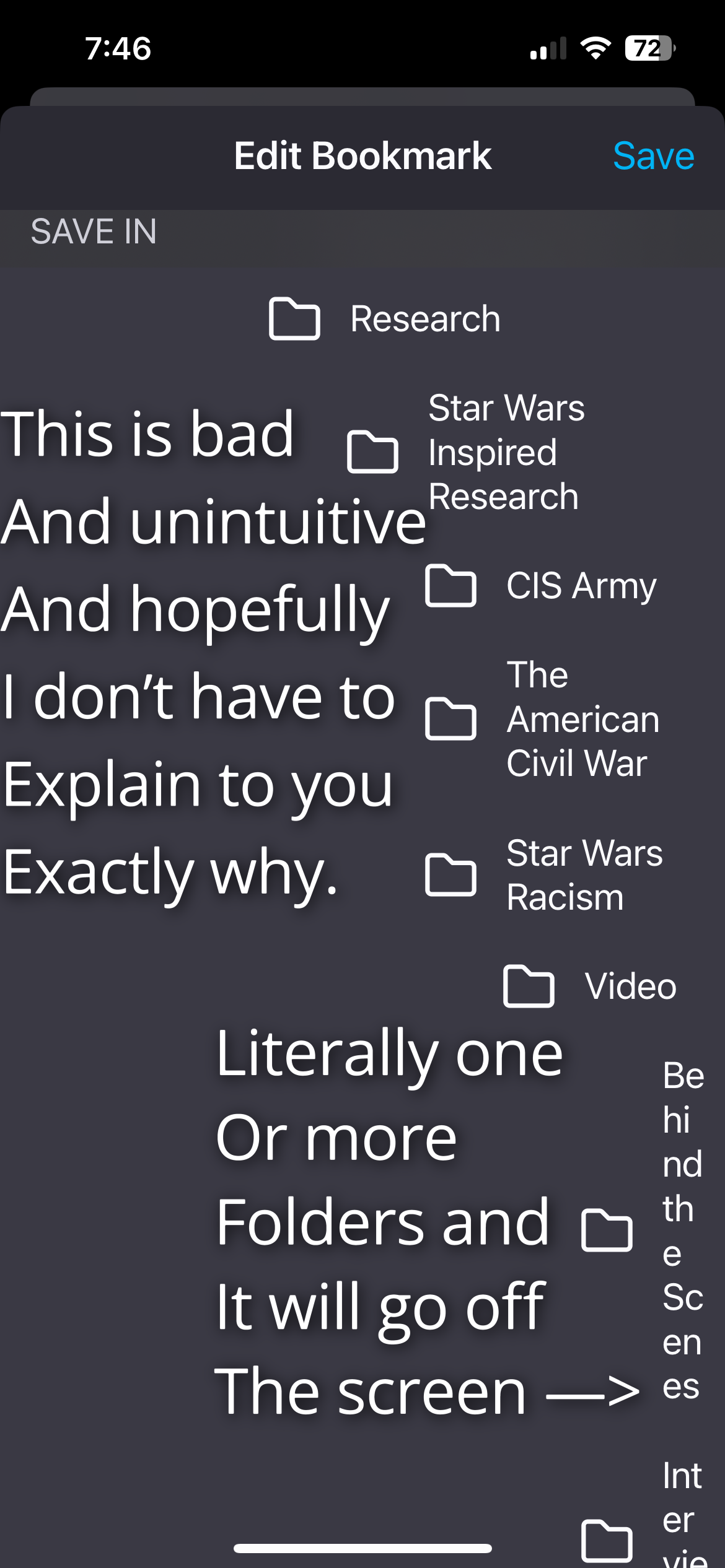
Firefox bookmarks on iOS devices are terrible.

Showing all bookmarks and folders all at once when saving a bookmark is beyond frustrating to use every time and it’s unnecessary. Please make folders selectable individually like they are on most other browsers with bookmarks rather than having to have all the bookmarks out at once. Maybe make it so pressing it opens and closes the folder, and holding it will put a bookmark in that folder. Or just have it so in bookmark saving mode, tapping/pressing the folder opens the folder, there’s a back arrow to get out of the folder, and a “save here” button or something on the other side of the back button to save the selected bookmark to whatever folder you are in. It’s not like that interferes with moving folders and bookmarks since you have to press the edit button before you can move those first anyway.
모든 댓글 (1)

Firefox bookmarks on iOS devices highlight a clear gap in user experience that could be addressed through better iOS app development practices. The current approach of displaying all bookmarks and folders at once when saving a bookmark feels cluttered and inefficient. A more effective design would allow users to navigate folders individually, similar to other browsers. For example, tapping a folder could open it, with a back option to navigate out, and a clear “save here” action inside. Adding simple interactions like tap-to-open and long-press-to-save would significantly improve usability without affecting existing edit features.
글쓴이 Shawn Miller 수정일시