


Can't restore tabs from jsonlz4 files

The method of putting an older jsonlz4 and naming it sessionstore. It's not working. I've also tried session history scrounger and it's just saying "session history file contents couldn't be read". Any ideas, I've lost a LOT of tabs to it forgetting the previous session.
I've tried all files from the session backup folder including the update backups and I used shadowexplorer to get my session files from the 18th.
선택된 해결법
Backup session files are fully corrupted, but I have my full history, so I can rebuild a lot of my tabs, but it's going to take a while. Thanks for trying.
모든 댓글 (8)
To update, it's not updating to the session I want, it just updating to the last used session, which is reddit at the moment. My session lof is giving me "1774104610413 SessionStore ERROR NotReadableError when reading session file: clean: NotReadableError: Could not read `C:\Users\short\AppData\Roaming\Mozilla\Firefox\Profiles\5fy0bc78.default-release\sessionstore.jsonlz4': could not decompress file: invalid LZ4 header: wrong magic number: `00 00 00 00 00 00 00 00 00 00 00 00' (NS_ERROR_FILE_CORRUPTED) No traceback available" when I try to load it. it's directly from a restore point found with ShadowExplorer
글쓴이 shortassmiller 수정일시
Did you check the content of the file backup file?
Are you sure that the file is valid and not corrupted or only contains null bites? Did you place the file at the main level in the profile folder? You may have to rename the sessionstore-backups folder temporarily
Here is a script for the Browser Console (not the Web Console) to decompress LZ4 files using IOUtils. https://gist.github.com/jscher2000/4403507e33df0918289619edb83f8193
I'm getting this. And I have no idea how to check if the file is null. All of my history is there, I just have no indication of what tabs were open as I had multiple windows and tab groups active at once.
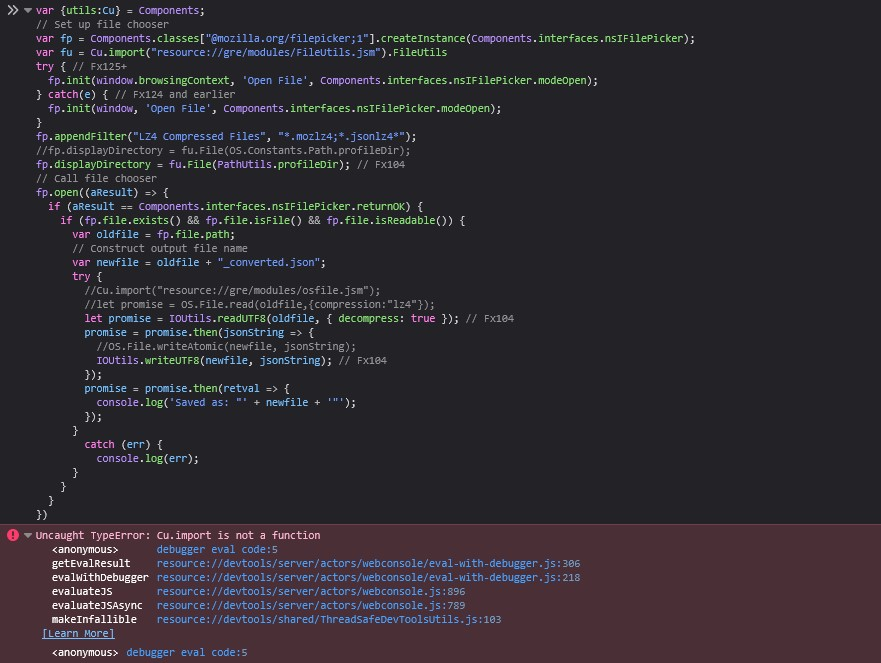
글쓴이 shortassmiller 수정일시
I think it may be corrupted, I opend the file in notepad. The new JSONLZ4 opens with text. The old one is blank, but there are what apears to be invisible characters that are highlightable. Unless all of the data has been turned into spaces. File is 3535kb for added info.
Try this code.
async function copyFile(inpFile, outFile) {
 var data = await IOUtils.readUTF8(inpFile, {decompress:true});
 await IOUtils.writeUTF8(outFile, data, {compress:false});
}
var fp = Cc["@mozilla.org/filepicker;1"].createInstance(Ci.nsIFilePicker);
fp.init(window.browsingContext, "Open File", Ci.nsIFilePicker.modeOpen);
fp.appendFilter("Bookmarks/Session (.jsonlz4)","*.jsonlz4");
fp.appendFilter("Search Engines (.mozlz4)","*.mozlz4");
fp.appendFilter("Add-ons Files (.lz4)","*.lz4");
fp.displayDirectory=FileUtils.File(PathUtils.join(PathUtils.profileDir, ""));
fp.open((aResult) => {
  if (aResult == Ci.nsIFilePicker.returnOK) {
  if (fp.file.exists() && fp.file.isFile() && fp.file.isReadable()) {
    var oldFile = fp.file.path;
    var newFile=oldFile.replace(/([.]moz)?lz4$/i,"")+(/lz4$/.test(oldFile)?"":"lz4");
    try {
      copyFile(oldFile, newFile);
      console.log("Saved as: \"file://" + newFile + "\"");
      prompt("Saved as:\n" + newFile, "file://" + newFile);
    }
    catch (err) {console.log(err);}
  } else {console.log("<ERROR>");}
  } else {console.log("<CANCELED>");}
});선택된 해결법
Backup session files are fully corrupted, but I have my full history, so I can rebuild a lot of my tabs, but it's going to take a while. Thanks for trying.
I see that you edited your question and it shows that the full file content consist of null bytes (00 00 00 00 00 00 00 00 00 00 00 00) and that the file is corrupted like I wrote in my first reply. Best is to verify that a backup is valid.
Yeah, I'm quite an amature when it comes to computers, so I didn't know that was what it meant.