


Windows 10 reached EOS (end of support) on October 14, 2025. If you are on Windows 10, see this article.

Mozilla 도움말 검색

고객 지원 사기를 피하세요. 저희는 여러분께 절대로 전화를 걸거나 문자를 보내거나 개인 정보를 공유하도록 요청하지 않습니다. "악용 사례 신고"옵션을 사용하여 의심스러운 활동을 신고해 주세요.

자세히 살펴보기
Open

Firefox Multi-Account Containers icon not appearing in toolbar (cannot pin)

Mark replied
yihanzhuo4

Description: I need help with the "Firefox Multi-Account Containers" extension.

The extension is installed and shows as "enabled" in my Add-ons Manager. However, the colorful container icon does NOT appear on my toolbar, so I cannot access or use the extension at all.

What I have already tried (none worked):

· Dragging the extension icon from the puzzle menu to the toolbar · Right-clicking on the extension icon (inside the puzzle menu) to see if there is a "Pin to Toolbar" option — but the option does NOT appear at all · Restarting Firefox multiple times · Restarting my computer · Creating a new profile in about:profiles and testing the extension there — still no icon · Disabling and re-enabling the extension

The extension is installed and enabled, but without the toolbar icon, I cannot create containers or separate my Gmail accounts. I really need this feature.

I have read that this might be a bug in recent Firefox versions. Is there a known fix? Do I need to completely uninstall Firefox and reinstall it? If so, could you please guide me on how to do a clean uninstall (removing all profile folders and registry entries) and then install the latest version?

My system is Windows (older version, if that matters).

Thank you very much for any help!

Description: I need help with the "Firefox Multi-Account Containers" extension. The extension is installed and shows as "enabled" in my Add-ons Manager. However, the colorful container icon does NOT appear on my toolbar, so I cannot access or use the extension at all. What I have already tried (none worked): · Dragging the extension icon from the puzzle menu to the toolbar · Right-clicking on the extension icon (inside the puzzle menu) to see if there is a "Pin to Toolbar" option — but the option does NOT appear at all · Restarting Firefox multiple times · Restarting my computer · Creating a new profile in about:profiles and testing the extension there — still no icon · Disabling and re-enabling the extension The extension is installed and enabled, but without the toolbar icon, I cannot create containers or separate my Gmail accounts. I really need this feature. I have read that this might be a bug in recent Firefox versions. Is there a known fix? Do I need to completely uninstall Firefox and reinstall it? If so, could you please guide me on how to do a clean uninstall (removing all profile folders and registry entries) and then install the latest version? My system is Windows (older version, if that matters). Thank you very much for any help!

모든 댓글 (1)

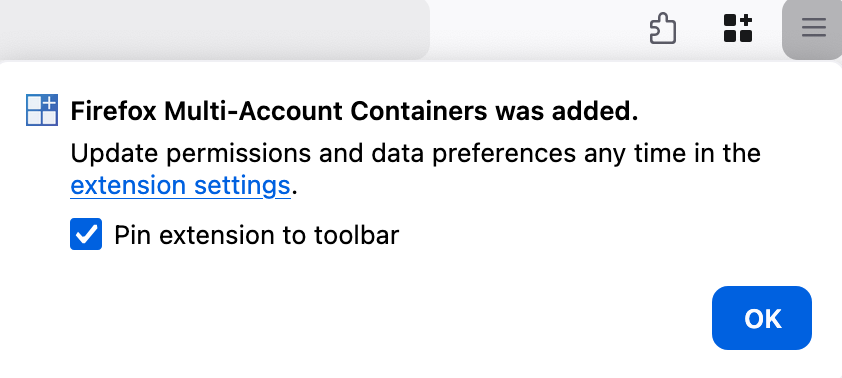
Can you remove the extension and then reinstall it at https://addons.mozilla.org/en-US/firefox/addon/multi-account-containers/ ? When you reinstall it, there should be a popup that displays a "Pin to toolbar" option. (Screenshot)
질문하기

글에 답글을 달기 위해서는 계정으로 로그인해야만 합니다. 계정이 아직 없다면 새로운 질문을 올려주세요.