


After Thunderbird installer download from Mozilla website, I cannot access either of my 2 yahoo accounts

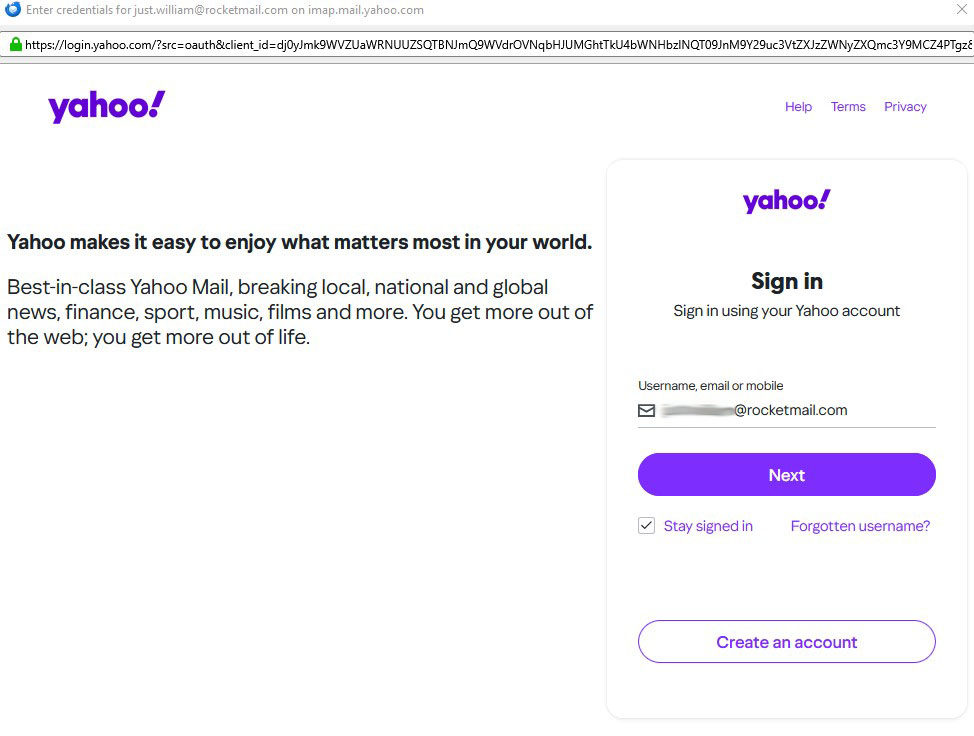
After downloading and running installer (Thunderbird setup 148.0) from Thunderbird website, Thunderbird opened as usual, showing my three email accounts. The 2 accounts I use for almost everything are both Yahoo accounts (yahoo.co.uk and rocketmail.com). But.. neither of these accounts will work without a yahoo sign-in pop which is pre-filled with an account name (example graphic attachment : thunderbird01red.jpg). 1 example shown but the same thing happens for both yahoo accounts.
The 'Next' button, which I assume will ask for password, does nothing.
I have attempted login via webmail. I enter account name, am asked for password and Yahoo insists on sending me a verification code - to the other yahoo account (the yahoo.co.uk account), which I cannot access! I then attempt to login to the other account to access my pass code and the same thing happens in reverse, telling me that a verification code will be sent to the first account.
Via Thunderbird, which has for years done all this automatically behind the scenes, I can get absolutely nowhere. Via webmail, I am in an 'impossibility loop'. I have cleared cache for each account.
Why won't Thunderbird allow automatic account login, as has been the case since the year dot. These are the 2 accounts around which my entire life is ordered - can somebody please help.
글쓴이 William 수정일시
모든 댓글 (2)
Make sure cookies and javascript are enabled. See https://support.mozilla.org/en-US/kb/thunderbird-and-yahoo for further guidance.
Please post here with all of your results so we can use the information to help all users.
HI Wayne,
Thanks for your mail and your suggestions. I did respond to an earlier mail, explaining that I had resolved the issue, namely that 148.0 has a code change to meet new OAuth2 authentication requirements from Yahoo and that a fresh login was required.
My problem was that I had 2 yahoo accounts, each of which was the 'backup' account for the other, therefore I was unable to access the OTP code which yahoo issues in connection with the fresh login requirement and a webmail login. I was able to get around yahoo's 'login impossibility loop' by using another computer on which I had not updated Thunderbird to version 148. I was then able to use webmail to access the OTP codes and login successfully, after which, everything was fine.
I have a couple of comments :- for any other Thunderbird users having 2 yahoo accounts, make sure they have a non-yahoo account as their backup. For Mozilla and/or Yahoo, if this was a known issue, some kind of advance advice push notification would have been jolly handy.
Many thanks for you help and advice though, because without it, I wouldn't have realised that I could use an older machine to get around the problem arising from Mozilla's code change and Yahoo's subsequent requirement for a fresh login.