


148.0 (64-bit) Cannot display full email headers?
Prior to installing v148.0, I could view an email's full header. This is very useful as you can see if it's genuine or a fake.
선택된 해결법
Third-party developers are actively communicated with, yet Thunderbird cannot afford to wait for all of them to update. They are independent developers and not employees. You can always click cntl and 'u' to view all headers for a given message.
문맥에 따라 이 답변을 읽어주세요 👍 0모든 댓글 (20)

It seems that you do not want all headers. You want the “from” header to show the whole e-mail address.
There is a general setting for that. I cannot look right now to see where it is. Have you checked it?
No, I do want to see the full header. I want to see the from 'journey', which all emails contain in their header. The 'journey' consists of the original email address and the name + location of the first and subsequent servers.
This is not available in v148.0 under Settings/General
I would say that “all headers” is what you want.
I do not have 148, so I do not know what happened to that menu option. Have you looked under the three-dot menu?
The three dot menu is absent as well :) Or do you mean the 3-bars menu? Plus the search box grows in size depending on the width of your monitor screen - you can't shorten it (make it a fixed size) to have more buttons up-front...
professorcad said
The three dot menu is absent as well :) Or do you mean the 3-bars menu? Plus the search box grows in size depending on the width of your monitor screen - you can't shorten it (make it a fixed size) to have more buttons up-front...
Sorry, yes, I meant the three-limed menu. Is the option there?
professorcad said
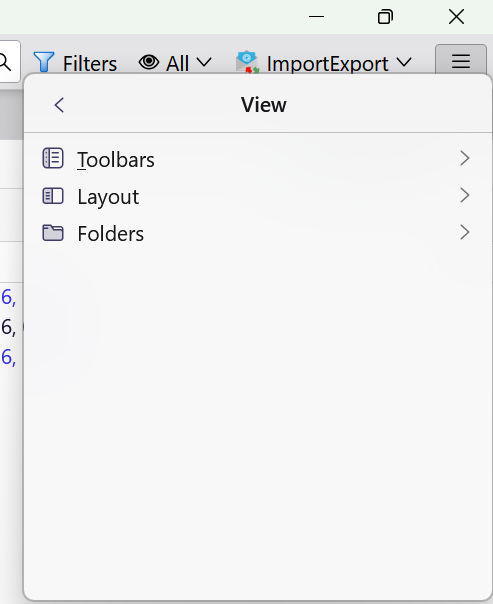
I'm afraid not - Headers are no longer in the View menu.
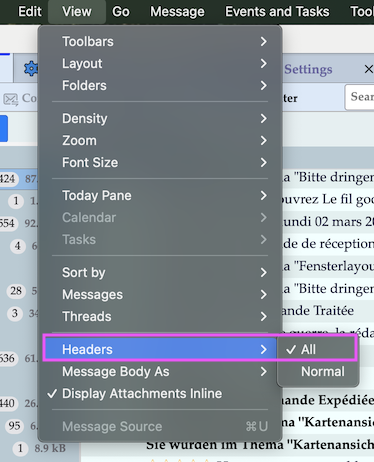
You sure? See my screen shot ....
The View menu is now only for the general appearance of the interface.
I thought it might have moved to the 3-bar menu, Tools perhaps, but it's not there. In an ideal world I would like to click a button or right-mouse-click the selected email to view the header for just that email. The solution in Thunderbird has always been all or nothing.
I have never seen an add-on for this task, but I feel Mozilla should give the 3rd Party programmers a bit more time before the launch of a new version. As it is, my favourite add-on, 'Filter Button' is not available for v148.0 and the built-in filter pop-up is nowhere near as good when it comes to applying the filters.
선택된 해결법
Third-party developers are actively communicated with, yet Thunderbird cannot afford to wait for all of them to update. They are independent developers and not employees. You can always click cntl and 'u' to view all headers for a given message.
Professorcad, would you please show a screen image of the same area that Mapenzi showed?
If the headers option is not there, I am guessing at a conflct with an extension. Start Thunderbird in troubleshooting mode (under the "help" menu) and see if that menu changes.
"Professorcad, would you please show a screen image of the same area that Mapenzi showed?"
I already have - as you can see, View is completely different.
"If the headers option is not there, I am guessing at a conflict with an extension."
There is no conflict with an extension because the two extensions I was using are not available on v148 :)
"You can always click cntl and 'u' to view all headers for a given message."
I never knew you could do this. It works very well! Some of the lines are not seen in their entirety because they are not folded and the window does not have horizontal scroll. However, that's a minor issue, if I felt I really needed to see the end of a long line, I can copy-paste into a text editor (Ultra Edit).
Many thanks to everyone for your help - I wasn't expecting so many responses, so quickly :)
professorcad said
"Professorcad, would you please show a screen image of the same area that Mapenzi showed?" I already have - as you can see, View is completely different.
No, you didn't. You showed a screen image from the three-lined menu. I would still like to know how the view menu in your application menu looks. And troubleshooting mode may still be worthwhile because it helps identify or rule out causes other than extension conflicts.
If the application menu is not visible and you are using Windows, press <alt>.
글쓴이 Rick 수정일시
In case this was not clear: the menu option that you need is probably where it has long been. If it is not there, there is a problem that can be fixed.
Hello Rick
"No, you didn't. You showed a screen image from the three-lined menu."
In v148, the View menu is a sub-menu of the 3 line menu. That's the only place it is found.
You could check it for yourself.......