


Windows 10 reached EOS (end of support) on October 14, 2025. For more information, see this article.

Mozilla 도움말 검색

고객 지원 사기를 피하세요. 저희는 여러분께 절대로 전화를 걸거나 문자를 보내거나 개인 정보를 공유하도록 요청하지 않습니다. "악용 사례 신고"옵션을 사용하여 의심스러운 활동을 신고해 주세요.

자세히 살펴보기

PDF Editor issues in v146.0 64bit on windows 10 pro

  • 답글 없음
  • 0 이 문제를 만남
  • 5 보기
more options

I'm begining to regret installing v146.0!

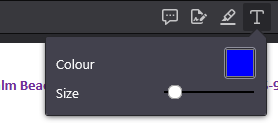
One of the most useful features of Firefox is the PDF editor and with this update, I've found that after annotating a PDF with several text boxes, clicking the text box icon (as shown in the attached screenshot) does absolutely nothing and it is impossible to enter any further text. The only way out of this is to refresh the pdf (after saving otherwise all changes will be lost) and then starting all over again only for the error to repeat itself making the editor almost unusable. Would really appreciate knowing how to work around this especially since to make my notes clearer, I change the color and the font size which is all lost everytime I have to refresh the PDF :-(

Incidentally, why are there so many updates? I prefer stable software that works rather than 'new features' that I never use!

Finally, Firefox used to have an amazing facility of making the Firefox private browser the default browser for Windows 10 but this was removed some years ago and can only be reinstated by changing registry keys. Everytime there's an update, these registry keys are overwritten :-(. Why was such a useful feature removed please?

Thanks in advance.
I'm begining to regret installing v146.0! One of the most useful features of Firefox is the PDF editor and with this update, I've found that after annotating a PDF with several text boxes, clicking the text box icon (as shown in the attached screenshot) does absolutely nothing and it is impossible to enter any further text. The only way out of this is to refresh the pdf (after saving otherwise all changes will be lost) and then starting all over again only for the error to repeat itself making the editor almost unusable. Would really appreciate knowing how to work around this especially since to make my notes clearer, I change the color and the font size which is all lost everytime I have to refresh the PDF :-( Incidentally, why are there so many updates? I prefer stable software that works rather than 'new features' that I never use! Finally, Firefox used to have an amazing facility of making the Firefox private browser the default browser for Windows 10 but this was removed some years ago and can only be reinstated by changing registry keys. Everytime there's an update, these registry keys are overwritten :-(. Why was such a useful feature removed please? Thanks in advance.
첨부된 스크린샷

글에 답글을 달기 위해서는 계정으로 로그인해야만 합니다. 계정이 아직 없다면 새로운 질문을 올려주세요.